
Market mapping, especially when using the PredictLeads Similar Companies Dataset market mapping approach, helps teams understand which companies operate in a specific space, how they relate to each other, and where new opportunities may exist.
For sales, investment, partnerships, and market intelligence teams, this usually means answering questions like:
- Which companies are similar to our best customers?
- Which competitors operate in the same category?
- Which accounts belong in the same market segment?
- Which companies should we prioritize next?
- Where are new clusters of opportunity appearing?
The challenge is that many market maps are built from static lists, manual research, broad industry categories, or incomplete company data. This often leads to maps that are too generic, outdated, or difficult to act on.
The PredictLeads Similar Companies Dataset helps teams build more structured and dynamic market maps by identifying companies that share relevant similarities.
Quick Answer
A Similar Companies Dataset helps teams find companies that resemble a known company, customer, competitor, or target account. It is useful for market mapping, ICP expansion, competitor research, account segmentation, and finding lookalike companies for GTM workflows.
Similar Companies vs Lookalike Companies
| Concept | Main question | Best use case |
|---|---|---|
| Similar companies | Which companies operate like or resemble this company? | Market mapping, competitor discovery, category analysis, account clustering. |
| Lookalike companies | Which companies resemble my best customers or target accounts? | ICP expansion, sales prospecting, audience building, account prioritization. |
| Combined with signals | Which similar companies are also hiring, funded, or changing? | Prioritizing companies that fit the segment and show active movement. |
Related Reading
- Company Lookalike API for GTM Workflows
- Find Companies Similar to Your Best Customers
- Company Lookalike Data for AI Agents
- Best Company Lookalike Tools in 2026
- Similar Companies Dataset Use Cases
- Find Lookalike Companies That Are Hiring or Funded
What Is the PredictLeads Similar Companies Dataset?
The PredictLeads Similar Companies Dataset provides structured data about companies that are similar to one another.
Instead of relying only on broad categories like “software,” “finance,” or “manufacturing,” similar company data can help teams identify companies that are closer in business model, market positioning, industry context, size, technology usage, or other company signals.
This makes the dataset useful for workflows where teams need to:
- Find lookalike companies
- Expand account lists
- Build market maps
- Identify competitors
- Segment companies into clusters
- Discover adjacent markets
- Prioritize companies that resemble existing customers or target accounts
For example, if a team already knows that a specific company is a strong fit, the Similar Companies Dataset can help surface other companies that may belong in the same segment.
What Does the Similar Companies Signal Actually Tell You?
The similar companies signal helps answer a simple but valuable question:
Which companies look meaningfully similar to this company?
That can be useful in several market mapping scenarios.
Finding lookalike accounts
Sales and growth teams can use similar company data to find accounts that resemble their best customers, strongest opportunities, or highest-value segments.
Understanding competitive landscapes
Market intelligence teams can use the dataset to identify companies operating in similar spaces, helping them map competitive or adjacent markets more clearly.
Expanding target account lists
Instead of starting from generic industry searches, teams can begin with a known company and expand outward into companies with similar characteristics.
Improving segmentation
Similar companies data can help teams group accounts into more relevant clusters instead of relying only on high-level industry tags.
Discovering adjacent markets
A company may have similarities with businesses outside its obvious category. This can help teams discover new markets, partnership opportunities, or expansion paths.
Where Teams Usually Get Market Mapping Wrong
Market mapping often becomes less useful when teams rely on data that is too broad, too static, or too dependent on manual interpretation.
Here are a few common mistakes.
Relying only on industry categories
Industry classifications are useful, but they are often too broad. Two companies may both be classified as software companies but serve completely different buyers, operate in different markets, and use different technologies.
Building static account lists
Markets change. Companies raise funding, launch new products, expand into new regions, change positioning, hire new teams, and adopt new technologies. A market map built once and never refreshed can quickly become outdated.
Using only one similarity factor
Company similarity is rarely based on just one attribute. A better market map usually considers multiple signals, such as business category, size, geography, technologies, growth signals, and recent company activity.
Treating “similar” as automatically relevant
Similar companies are a starting point, not the final answer. Teams should still filter, enrich, and validate results based on their specific use case.
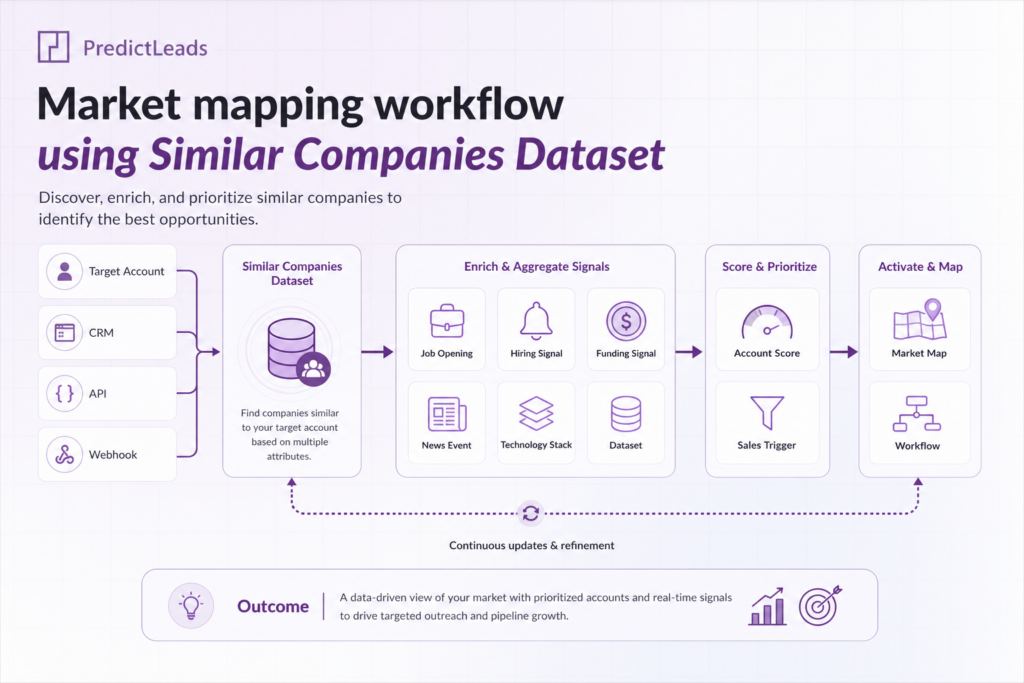
How to Use the Similar Companies Dataset in a Market Mapping Workflow
The PredictLeads Similar Companies Dataset can be used as a starting point for building structured account maps, competitor maps, market landscapes, or expansion lists.
1. Start With a Known Company or Segment
Begin with a company or group of companies that represents the market you want to understand.
This could be:
- A current customer
- A competitor
- A portfolio company
- A high-fit sales account
- A company in a target category
- A strategic partner
- A market leader
Starting with a known company gives the workflow a clear anchor.
2. Find Similar Companies
Use the Similar Companies Dataset to identify companies that resemble your anchor company or target segment.
This helps create an initial market map based on company similarity rather than manual list building.
3. Filter for Relevance
Once you have a broader list of similar companies, narrow it down using additional filters.
Useful filters may include:
- Geography
- Industry
- Company size
- Employee count
- Technologies used
- Recent funding activity
- Recent news events
- Hiring activity
- Website changes
This step helps turn a broad similarity list into a relevant working segment.
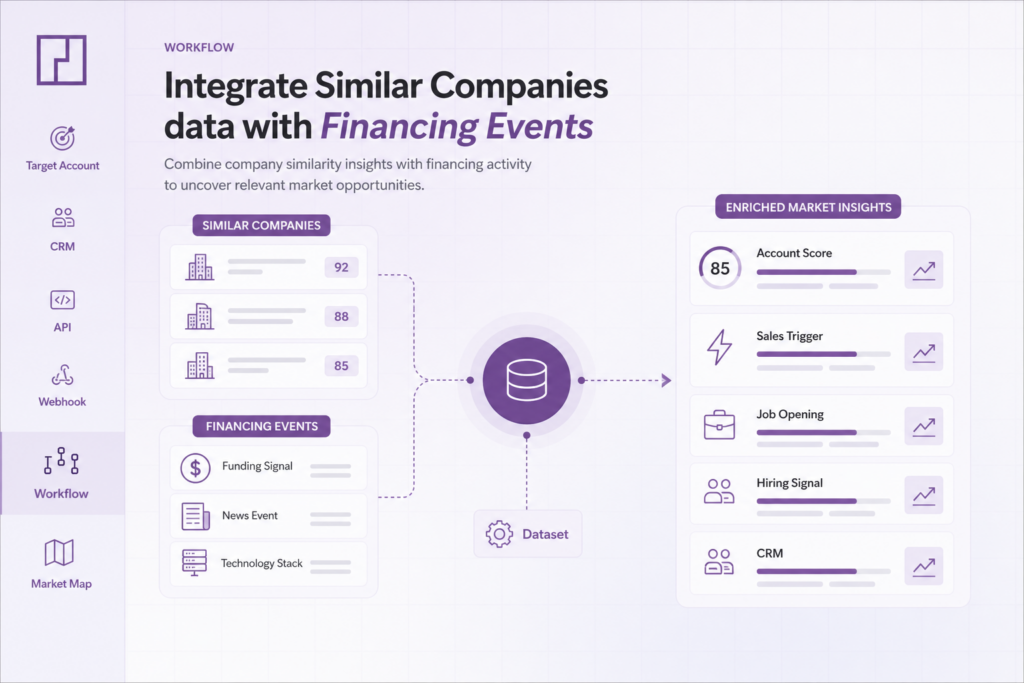
4. Enrich With Additional Company Signals
Similar companies data becomes more useful when combined with other company datasets.
For example, you can enrich similar companies with:
- Job openings data
- News events
- Financing events
- Technologies data
- Company firmographics
- Website evolution signals
This gives teams more context about why a company may be relevant and what action to take next.
5. Segment and Cluster the Market
After enrichment, group companies into smaller clusters.
For example, you might cluster companies by:
- Use case
- Region
- Industry vertical
- Company size
- Technology stack
- Funding stage
- Hiring activity
- Strategic fit
This makes the market map easier to understand and more actionable.
6. Prioritize Accounts or Opportunities
Finally, use the enriched market map to prioritize next steps.
Sales teams may prioritize accounts that resemble their best customers and show recent growth signals. Investors may prioritize companies similar to portfolio companies or emerging category leaders. Partnership teams may identify companies that operate in adjacent markets.
What Fields Matter in the Similar Companies Dataset?
The exact fields used will depend on the workflow, but the most useful market mapping inputs usually include:
- Company name
- Company domain
- Company identifier
- Similar company relationship
- Similarity score or ranking, where available
- Industry or category
- Company location
- Company size or employee count
- Technologies used
- Related company signals from other datasets
These fields help teams connect similar company data to internal systems, enrich account records, and build repeatable market mapping workflows.
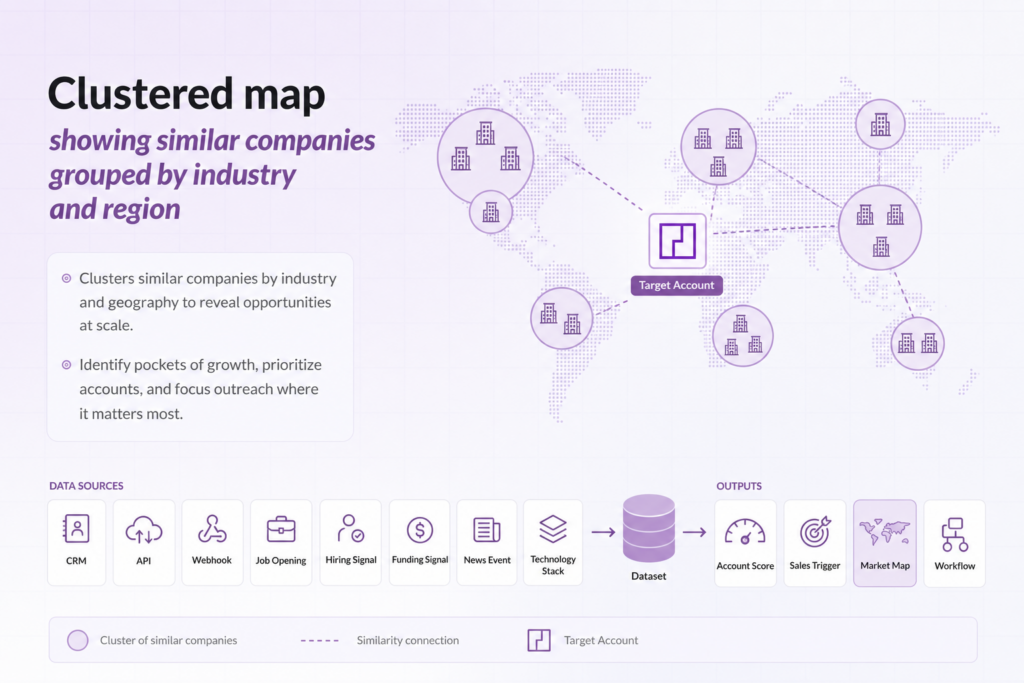
A Simple Example With Similar Companies Dataset for market mapping
Imagine a sales team that has strong traction with mid-sized B2B software companies in North America.
Instead of manually searching for more companies in the same broad category, the team can use the PredictLeads Similar Companies Dataset to build a more targeted market map.
The workflow could look like this:
- Start with a list of best-fit customers.
- Use the Similar Companies Dataset to find lookalike companies.
- Filter results for North America and relevant company size.
- Enrich the companies with technologies data to identify relevant software usage.
- Cross-reference with job openings data to find companies showing growth signals.
- Group companies into clusters based on industry, region, and technology stack.
- Prioritize accounts that resemble existing customers and show signs of active growth.
This creates a more actionable market map than a static industry list.
Where PredictLeads Similar Companies Dataset Fits
PredictLeads is useful when teams need structured company signals that can be queried, monitored, enriched, or loaded into internal systems.
The PredictLeads Similar Companies Dataset can support market mapping by helping teams find related companies, expand account lists, and build more precise company segments.
It becomes even more powerful when combined with other PredictLeads datasets, such as:
- Job Openings Dataset
- News Events Dataset
- Financing Events Dataset
- Technologies Dataset
- Website Evolution Dataset
Together, these signals can help teams understand not only which companies are similar, but also which ones are growing, changing, hiring, raising capital, or showing signs of market movement.
FAQ
It can be used to find companies that resemble a known company, customer, competitor, or target account. These similar companies can then be filtered, enriched, segmented, and prioritized. This helps with building more actionable market map.
Yes. Teams can start with existing customers or high-fit target accounts and use the dataset to discover companies with similar characteristics.
Yes. Similar company data can be combined with datasets such: as Job Openings, News Events, Financing Events, Technologies, and Website Evolution. This adds more context to each company.
Yes. It can support sales, investment research, competitive intelligence, partnerships, market analysis, and strategic planning workflows.
Conclusion
Market mapping becomes more useful when it is built on structured, relevant, and refreshable company data.
The PredictLeads Similar Companies Dataset helps teams move beyond static account lists and broad industry categories by identifying companies that share meaningful similarities.
For sales, investment, partnerships, and market intelligence teams, this can support better segmentation, account discovery, competitive research, and market analysis.
For more details on integrating PredictLeads datasets into your workflows, visit:
Pingback: How to Find Companies Similar to Your Best Customers