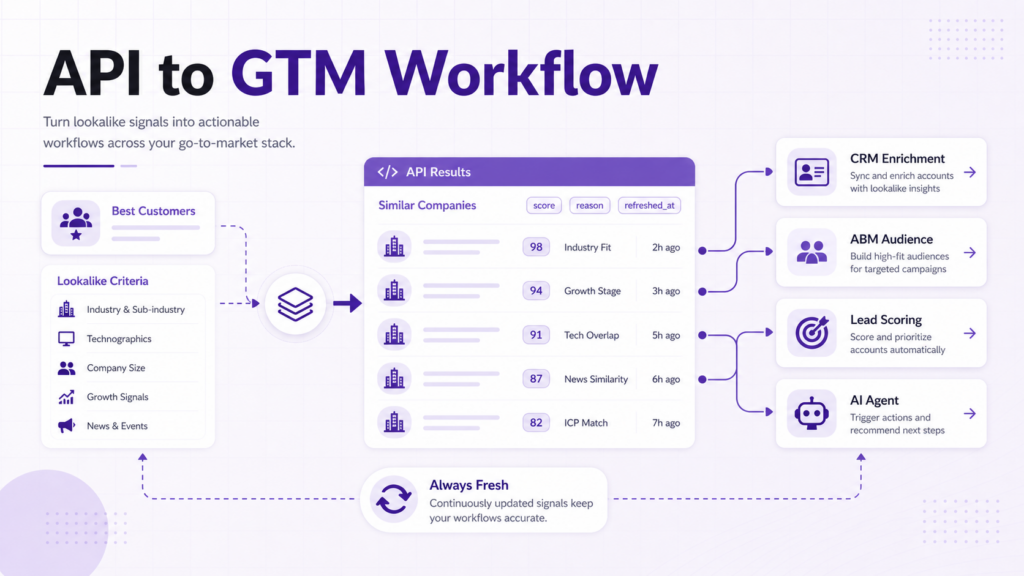
A company lookalike API helps teams retrieve similar companies programmatically.
Instead of asking a sales rep to manually search for lookalike accounts in a web app, a GTM system can request similar companies for a customer, competitor, prospect, or target account and then use the results inside a workflow.
That difference matters since a UI is useful for exploration. An API is useful when similar-company data needs to power CRM enrichment, account scoring, routing, AI agents, dashboards, or product features.
Related Reading
- Similar Companies Dataset for Market Mapping
- Find Companies Similar to Your Best Customers
- Company Lookalike Data for AI Agents
What is a company lookalike API?
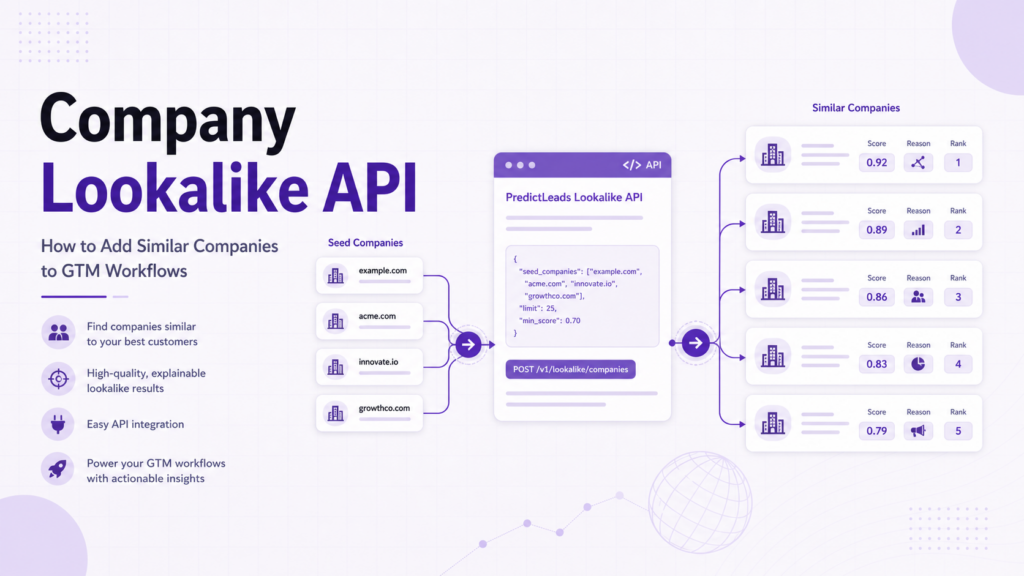
A company lookalike API is an endpoint that returns companies similar to a given company or account.
The input is often a company domain or company ID. The output is usually a list of similar companies, often with scores, positions, reasons, and related company attributes.
With PredictLeads, the relevant endpoint is:
/companies/{company_id_or_domain}/similar_companiesThe local PredictLeads schema says this endpoint returns a list of a company’s similar companies and, for the top 20, provides a reason why they are considered similar.
That reason is important. It helps teams understand the match and makes the output easier to use in sales, marketing, and AI workflows.
For a wider provider comparison, see Best Company Lookalike Tools in 2026.
Why use an API instead of only a lookalike search UI?
A lookalike search UI is useful when a user wants to explore accounts manually.
An API is better when the workflow needs to run repeatedly, automatically, or inside another product.
Use an API when you need to:
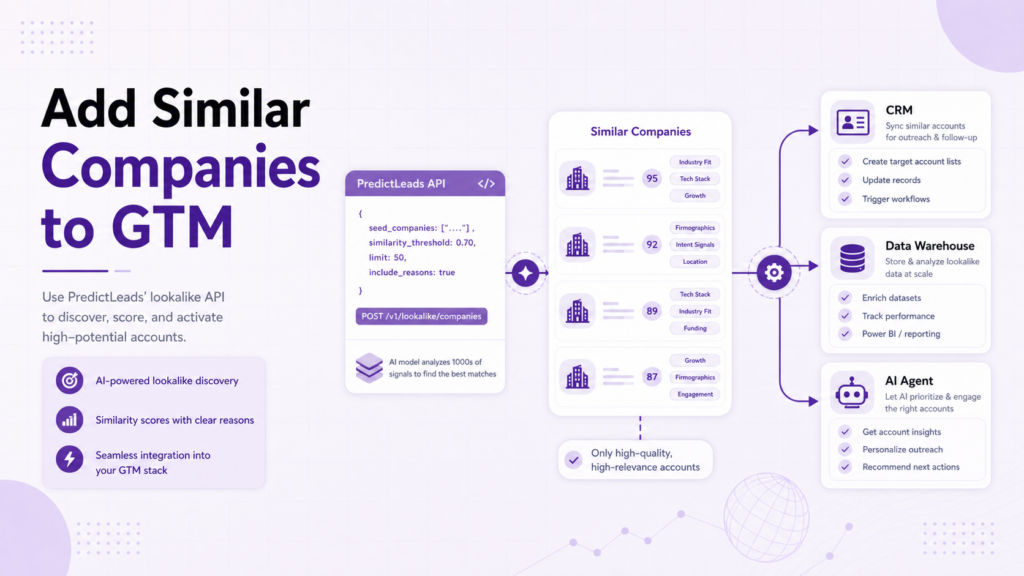
- Enrich CRM accounts with similar-company recommendations
- Build lookalike account lists automatically
- Add company recommendations to an internal tool
- Trigger account expansion workflows
- Feed similar-company context into AI agents
- Store similarity scores in a warehouse
- Create product features around related companies
This is the main difference between dataset-first workflows and UI-first workflows. UI tools help people search. APIs help systems act.
What fields should a company lookalike API return?
A useful company lookalike API should return more than a company name.
Important fields include:
- Similar company identifier
- Similar company domain
- Similarity score
- Position or rank
- Similarity reason
- Refreshed timestamp
- Relationship between the seed company and the similar company
PredictLeads similar-company records can include a score, position, reason, and refreshed_at timestamp. The score helps with ranking. The reason helps with interpretation. The timestamp helps teams understand freshness.
GTM workflow 1: CRM account expansion
The most common workflow is account expansion.
A RevOps team can take current customers, target accounts, or strategic opportunities and retrieve similar companies for each one.
The workflow can look like this:
- Select seed accounts from the CRM.
- Use company domains as API inputs.
- Retrieve similar companies.
- Store score, position, and reason.
- Remove current customers, open opportunities, and bad-fit accounts.
- Route the remaining list to sales or marketing.
This creates a repeatable process for turning known accounts into new target accounts.
You can also combine this approach with workflows for finding companies which operate in a specific space
GTM workflow 2: ABM audience expansion
Marketing teams can use a company lookalike API to expand account-based marketing audiences.
Instead of building audiences only from firmographic filters, the team can start with high-fit accounts and retrieve related companies.
The output can support:
- LinkedIn Matched Audiences
- CRM campaign lists
- Sales and marketing alignment lists
- Segment-specific landing page campaigns
- Content syndication targeting
The key is to preserve the similarity reason. It can help marketers understand which message or segment may fit the account.
GTM workflow 3: Lead scoring and prioritization
Similar-company data can also support scoring.
For example, a company may receive a higher fit score if it is similar to several high-value customers. Another account may receive a lower score if it is similar to a customer segment that rarely converts.
A simple scoring model might include:
- Similarity to best customers
- Number of seed customers matched
- Highest similarity score
- Strength of similarity reason
- Segment fit
- Recent company activity from other datasets
This does not replace sales judgment, but it gives teams better inputs for prioritization.
GTM workflow 4: AI account research
AI agents need structured context.
A company lookalike API can give an agent a list of related accounts and reasons why those accounts are similar.
An agent can use that context to:
- Summarize related companies
- Explain why a prospect fits an ICP
- Suggest account segments
- Recommend next accounts for research
- Draft account notes for sales teams
- Compare a prospect to known customers
The reason field is especially helpful because it gives the agent an explanation to work from instead of forcing it to infer everything from raw company names.
GTM workflow 5: Product recommendations
Data platforms and SaaS products can use similar-company data inside the product experience.
Examples include:
- “Companies similar to this account”
- “Related companies to research next”
- “Lookalike accounts for this segment”
- “Similar companies for market mapping”
- “Recommended accounts based on your customer list”
In this case, the company lookalike API becomes infrastructure. It powers a product feature rather than a one-time export.
Implementation checklist
Before adding a company lookalike API to a GTM workflow, define the workflow clearly.
Useful questions:
- What seed accounts will be used?
- How many similar companies should be returned per seed?
- Which fields need to be stored?
- How will duplicate matches be handled?
- Should results be refreshed on a schedule?
- Which accounts should be excluded?
- Where should the output go?
- Who reviews the results?
The workflow should also define how to use the similarity reason. A reason can support prioritization, outreach context, segmentation, or AI summaries.
Common mistakes made while using company lookalike API
The first mistake is using the API as a list generator without a workflow. Similar-company data becomes more valuable when it is connected to routing, scoring, enrichment, or research.
The second mistake is ignoring freshness. A refreshed_at timestamp can help teams understand when the relationship was last updated.
The third mistake is treating similar companies as ready-to-buy accounts. Similarity is a fit signal, not intent by itself.
The fourth mistake is losing the reason field. The reason is often what makes the result explainable.
Final takeaway
A company lookalike API is useful when similar-company data needs to work inside systems.
It can help teams enrich accounts, expand ABM audiences, power AI agents, recommend related companies, and build repeatable GTM workflows from known customers or target accounts.
PredictLeads is a strong fit when teams need structured similar-company data through API access rather than only a prospecting interface.
Compare the best company lookalike tools in 2026, or explore the PredictLeads API documentation.