AI agents are becoming more useful in sales, market research, RevOps, and data workflows. One factor contributing to their effectiveness is leveraging company lookalike data for AI agents.
But an agent is only as useful as the data it can access. If an agent only has a company name and a few firmographic fields, it can summarize the account, but it may struggle to find truly relevant next accounts.
Company lookalike data gives AI agents a structured way to find similar accounts automatically.
Instead of guessing which companies resemble a customer, competitor, or target account, the agent can retrieve similar companies, read similarity scores, use similarity reasons, and explain why each account may be relevant.
What is company lookalike data for AI agents?
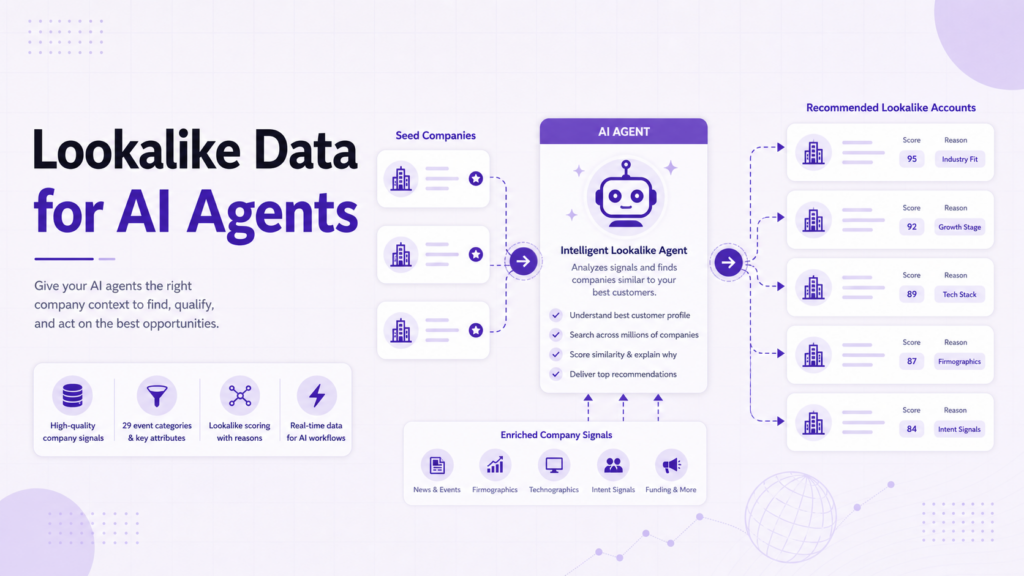
Company lookalike data is structured data that identifies companies similar to a seed company.
For AI agents, the most useful lookalike data includes:
- The seed company
- The similar company
- Similarity score
- Position or rank
- Similarity reason
- Refreshed timestamp
- Related company attributes
The reason field matters because it gives the agent explanation-ready context. An agent can use it to answer questions such as:
- “Why is this company a good fit?”
- “How is this account similar to our best customer?”
PredictLeads Similar Companies Dataset supports this kind of workflow because the similar companies endpoint returns similar companies and, for the top matches, explains why they are considered similar.
If you are comparing providers for this use case, see our detailed comparison of company lookalike data providers.
Why AI agents need structured lookalike data
An AI agent can read websites and summarize accounts, but that is not the same as having structured account recommendations.
Without lookalike data, an agent may rely on broad assumptions:
- Similar industry
- Similar keywords
- Similar company size
- Similar geography
Those signals can be useful, but they are incomplete.
A structured similar-company dataset gives the agent a clearer starting point.
It can retrieve known similar companies, preserve the score, store the reason, and use that context in downstream tasks.
This helps reduce vague recommendations and makes the agent’s output easier to audit.
Agent workflow 1: Find similar accounts from a target company
The simplest workflow starts with one company.
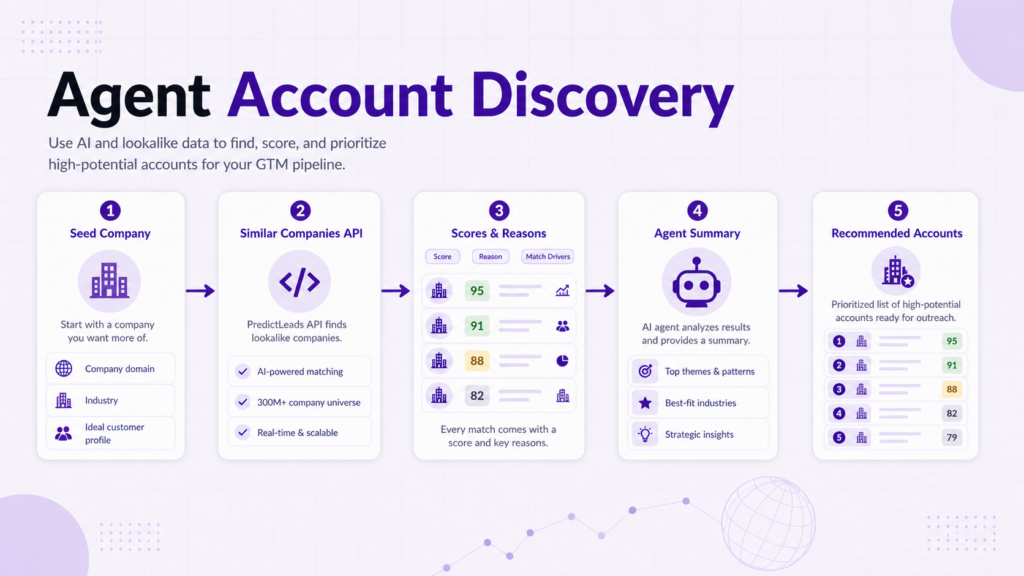
The agent receives a domain, retrieves similar companies, and returns a ranked list with reasons.
A prompt might say:
“Find companies similar to this account. Return the top matches, explain why each company is similar, and flag which ones should be reviewed by sales.”
The workflow can look like this:
- Receive company domain.
- Call the similar companies endpoint.
- Read score, position, reason, and related company data.
- Remove irrelevant or existing accounts.
- Summarize the best matches.
- Recommend next actions.
This is useful for account expansion from a single customer, competitor, or target account.
Agent workflow 2: Expand from best customers
A stronger workflow starts with a group of best customers.
The agent can retrieve similar companies for each customer, combine results, and rank accounts based on repeated matches.
For example, if the same company appears as similar to three best customers, it may be a stronger fit than a company that appears once.
The agent can create a table with:
- Similar company
- Matched seed customers
- Highest similarity score
- Reasons
- Suggested segment
- Recommended follow-up
This turns lookalike data into a repeatable GTM research workflow.
For the human version of this process, see companies similar to your best customers.
Agent workflow 3: Explain account fit
AI agents are often asked to explain why an account matters.
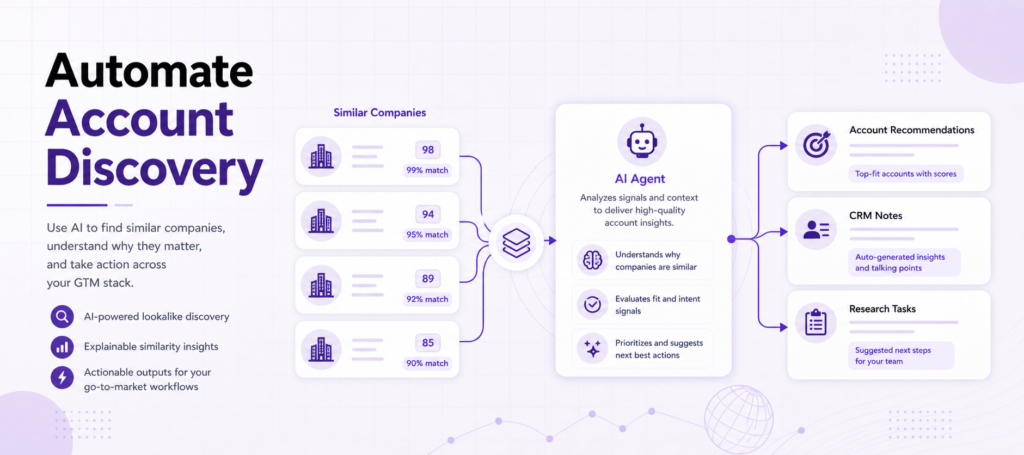
Company lookalike data helps because it gives the agent an evidence path:
- This company is similar to a known customer
- The similarity score is high
- The similarity reason explains the match
- Other company signals can support or weaken the recommendation
The agent can turn that into a short account note:
“This account resembles two high-fit customers based on product category and market positioning. It may be a good fit for the same outbound segment.”
That kind of explanation is more useful than a generic “recommended account” label.
Agent workflow 4: Combine lookalikes with company signals
Lookalike data is strongest when paired with other company signals.
An agent can combine similar-company results with:
- News events
- Job openings
- Technology detections
- Financing events
- Product signals
- Website evolution signals
For example:
- A company may be similar to your best customers and also hiring for a relevant team.
- Another may be similar and recently received funding.
- Another may be similar and launching a new product.
The lookalike signal explains fit. The additional signals explain timing or urgency.
This is where AI agents become more valuable than static enrichment workflows.
Agent workflow 5: Add recommendations inside a product
Company lookalike data can also power product features.
Examples include:
- “Find similar accounts”
- “Research companies like this one”
- “Recommend accounts for this segment”
- “Show competitors and adjacent companies”
- “Build a new account list from this customer”
An AI agent can sit on top of this data and create:
- Summaries
- Explanations
- Filters
- Suggested workflows
- Prioritized account recommendations
This is useful for:
- Data products
- Sales intelligence platforms
- RevOps systems
- Internal research tools
- AI-powered enrichment workflows
What the agent should not do
The agent should not treat similarity as proof of intent.
A similar company may be a good fit, but it may not be ready to buy.
The agent should describe similarity as fit context, not as a buying trigger by itself.
The agent should also avoid inventing reasons and if the dataset provides a similarity reason, use it.
If a reason is missing, the agent should say the reason is unavailable instead of hallucinating an explanation.
Finally, the agent should preserve the original source data whenever possible.
Similarity scores, positions, and reasons should remain visible inside the workflow.
A practical agent prompt
A useful internal agent prompt might look like this:
“Given this company domain, retrieve similar companies. Return the top matches with score, position, and reason. Remove existing customers and open opportunities. Group the remaining companies by likely segment. Explain why each top account should be reviewed. Do not claim buying intent unless another signal supports it.”
That prompt keeps the agent grounded.
It tells the agent to:
- use structured data
- preserve the reason field
- avoid overclaiming
- generate reviewable recommendations
This produces output that sales and RevOps teams can trust more easily.
Why this matters for GTM systems using company lookalike data for AI agents
AI agents are moving beyond simple summarization.
Modern GTM systems increasingly expect agents to:
- recommend accounts
- prioritize opportunities
- enrich CRM records
- explain fit
- generate research notes
- automate account discovery
To do that effectively, the agent needs structured account relationships.
Company lookalike data becomes a foundational layer for:
- AI SDR workflows
- RevOps automation
- account scoring systems
- AI research assistants
- product recommendations
- intelligent enrichment pipelines
The stronger the similarity signals and explanations, the more useful the downstream AI workflow becomes.
Final takeaway
Company lookalike data helps AI agents move from account summarization to account discovery.
With similar-company records, scores, and reasons, agents can:
- recommend related accounts
- explain fit
- expand best-customer lists
- support GTM workflows
- automate research tasks
PredictLeads is especially useful when AI agents need structured similar-company data through API access rather than only a manual prospecting interface.
Compare providers in our company lookalike tools comparison, or explore the PredictLeads API documentation.