
Account-based marketing works best when you can answer one simple question with confidence: which accounts should we focus on right now? Firmographics (industry, size, HQ) help, but they rarely explain why an account is a fit, what they’re building, or what message will resonate.
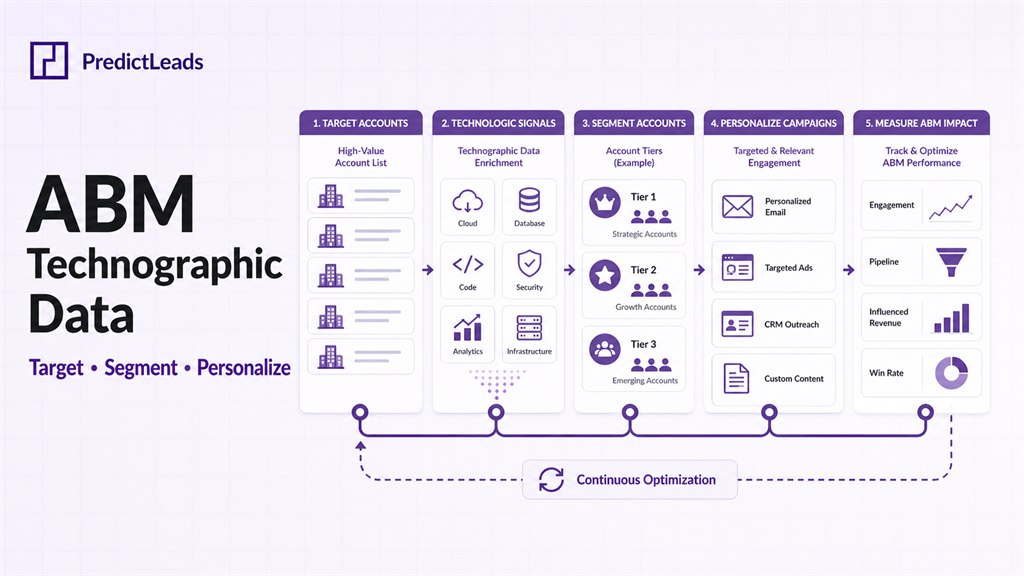
That’s where technographic data comes in. In ABM, technographics turn account lists into actionable segments—so you can prioritize, route, and personalize based on the tools a company already uses (and the ones they’re likely to adopt next).
This guide explains what account-based marketing technographic data is, how GTM teams use it, and how to operationalize it in a scalable workflow (including how to combine it with other company signals like hiring and news).
What is technographic data (in ABM terms)?
Technographic data describes the technologies a company uses—typically software, cloud providers, analytics tools, marketing platforms, security solutions, data infrastructure, and other parts of the “stack.”
In ABM, technographics are most useful when they help you answer questions like:
- Is this account already using a competing product?
- Do they have a complementary tool that makes integration easy?
- Are they likely to need our product based on their stack maturity?
- Can we tailor outreach based on tools they use today?
Why technographics matter for ABM (beyond “better targeting”)
ABM teams usually care about three outcomes: prioritization, relevance, and timing. Technographics support all three:
- Prioritization: Segment accounts by stack fit (e.g., “uses Snowflake” or “uses Salesforce + Marketo”).
- Relevance: Personalize messaging, proof points, and playbooks by the tools they already know.
- Timing: Detect stack changes (new tools adopted, migrations, or modernization) that indicate evaluation windows.
If you’re building ABM around signals, technographics also combine naturally with other account changes—like hiring signals and company news sales triggers.
ABM use cases for technographic data
1) Build a stack-based ICP (and exclude poor-fit accounts)
Instead of a broad ICP like “B2B SaaS, 200–2,000 employees,” create a stack-based ICP such as:
- Uses a specific CRM/marketing automation tool (or a competing platform)
- Uses a data warehouse / BI tool that indicates maturity
- Uses cloud providers that align with your security/compliance posture
Technographics can also power exclusion logic (e.g., existing customers, specific competitor usage, or stacks that don’t support your deployment model).
2) Segment accounts into ABM plays
Technographics enable “plays” that are easy to operationalize:
- Competitive displacement: Accounts using a competitor tool.
- Integration-led play: Accounts using a complementary product where you have an integration.
- Modernization play: Accounts moving from legacy systems toward cloud-native tools.
- Security/compliance play: Accounts adopting security tooling (or lacking it).
Each play can have dedicated messaging, proof points, and case studies—making ABM feel less generic and more “built for them.”
3) Personalize outreach without inventing details
Technographics help you be specific without being creepy. Good personalization is about aligning value props, not pretending you know internal plans.
Examples of safe, useful personalization:
- “Teams using X often run into Y at scale—here’s how we solve it.”
- “If you’re standardizing on tool family, these are the integration patterns we see.”
- “Here’s a 2-minute overview of how we fit next to category tools.”
4) Route and prioritize accounts for SDRs / AEs
When technographics are mapped to fit, you can:
- Route accounts to reps with the right product expertise (e.g., cloud/security vs. data/analytics).
- Prioritize accounts by a score (stack fit + other triggers).
- Auto-generate “why now” context for first-touch tasks.
How to operationalize technographic ABM (a practical workflow)
Most teams struggle not with “getting data,” but with turning data into repeatable actions. A scalable workflow looks like this:
Step 1: Define the account list and ideal segments
Start with a clear boundary:
- Target account universe (TAM / named accounts / inbound accounts)
- Core segments (competitive, integration-led, modernization, etc.)
- “Must-have” vs. “nice-to-have” technologies
Step 2: Normalize technologies into consistent categories
Tech stacks are messy. To avoid brittle logic, normalize tools into categories (e.g., CRM, MAP, warehouse, BI, CDP, iPaaS, cloud, security). That lets you build rules like:
- “Uses a CDP” instead of “uses Segment specifically”
- “Uses a warehouse” instead of “uses Snowflake only”
Step 3: Combine technographics with other account signals
Technographics are powerful on their own, but the best ABM programs combine multiple signals for timing and intent. Common combos:
- Technographics + hiring: engineering/data hiring suggests scaling, implementation, or modernization.
- Technographics + company news: launches, partnerships, and expansions can create evaluation windows.
- Technographics + similar companies: expand into lookalikes with proven stack patterns.
For example, you can start with a stack-based ICP, then use news events to trigger “why now” prioritization. See: tracking company news alerts and the PredictLeads news event categories guide.
Step 4: Turn segments into actions (ads, outbound, sequences, and routing)
Make the segmentation operational:
- Paid ABM: build audiences by stack segment and tailor landing pages per segment.
- Outbound: create sequences per stack segment with relevant proof points.
- Lifecycle: trigger plays when an account enters/leaves a segment.
- CRM enrichment: write segment tags and scores into CRM fields for routing and reporting.
Internal-link gaps you can fix quickly
If you already publish content about signals and data enrichment, technographics can become a “hub connector” between clusters. Useful internal links to add across your site:
- From technographics to company news data vs. news APIs
- From technographics to hiring: Hiring signals for B2B sales
- From ABM segmentation to lookalikes: Company lookalike API
How PredictLeads fits (technographics + signals for ABM)
PredictLeads helps GTM teams enrich accounts with company-level signals that can be used for segmentation and “why now” prioritization—across technographics, hiring, and company news. If you’re building an ABM workflow where reps and agents can act on stack + triggers, start here:
- Technographic Data API for B2B enrichment
- Company news data for sales triggers and lead scoring
- Hiring signals for account prioritization
CTA: If you want to map accounts by stack and trigger ABM plays when something changes, explore PredictLeads datasets and APIs—or reach out for a quick fit check based on your ICP and target segments.
FAQ: account-based marketing technographic data
Is technographic data accurate enough for ABM?
It can be, as long as you treat it as probabilistic and design workflows that tolerate uncertainty (e.g., category-level rules, multiple signals, and validation steps for high-value accounts).
How do I avoid “creepy” personalization?
Use technographics to tailor relevance (integration patterns, category pain points, and value props) rather than claiming insider knowledge. Keep language conditional (“teams using X often…”).
What’s the fastest way to get value from technographics?
Start with 2–3 high-impact segments: competitive displacement, integration-led, and modernization. Publish a short landing page per segment and run one outbound sequence per segment.
Can technographics help find more accounts like our best customers?
Yes—when combined with similar-company discovery. You can expand lookalikes, then filter/prioritize by stack fit. See: how to find companies similar to your best customers.
Last updated: May 14, 2026.