
PredictLeads AI automation helps GTM, sales, RevOps, and data teams connect structured company intelligence with workflow automation tools. PredictLeads is not a chatbot platform. It provides company data that AI agents and automation systems can use to enrich accounts, monitor buying signals, trigger alerts, score leads, and personalize outreach.
You can connect PredictLeads with tools such as Activepieces, n8n, Make, Zapier, and Bardeen to automate workflows around job openings, company news, technology detections, funding events, similar companies, and other real-time company signals.
This guide explains which automation tool fits which workflow, what PredictLeads data can return, and how teams can use PredictLeads AI automation for GTM operations, enrichment, and account monitoring.
What Is PredictLeads AI Automation?
PredictLeads AI automation means using PredictLeads data inside AI agents, workflow automation tools, and GTM systems. The automation tool handles the workflow logic. PredictLeads supplies the structured company signals that make the workflow useful.
For example, an AI agent can use PredictLeads data to check whether a company is hiring, what technologies it uses, whether it recently raised funding, whether it announced a partnership, or whether it looks similar to your best customers.
Related guides: how AI sales agents use PredictLeads, company news data providers, and job data providers.
Quick Comparison: PredictLeads AI Automation Tools
| Tool | Best for | Example PredictLeads workflow |
|---|---|---|
| Activepieces | Open-source no-code automation | Enrich new company domains and send results to Sheets, Slack, or CRM |
| n8n | More technical workflow logic | Find companies hiring AI engineers, filter by technology stack, and route to sales |
| Make | Visual GTM workflows | Monitor company news events and create account alerts |
| Zapier | Simple app-to-app automation | Add PredictLeads data to Google Sheets, HubSpot, Airtable, or Slack |
| Bardeen | Browser-based AI workflows | Enrich prospect lists from browser research and draft personalized outreach |
What Data Can PredictLeads Return?
PredictLeads can return structured company intelligence that automation tools can use inside workflows. Depending on the workflow and endpoint, teams can work with signals such as:
- Company profiles: company-level information for enrichment and account context.
- Job openings: hiring activity, job titles, locations, job descriptions, and growth signals.
- Technology detections: technologies associated with a company domain or technology category.
- News events: funding, partnerships, acquisitions, product launches, expansion, leadership changes, and other company events.
- Connections: relationships between companies, customers, partners, vendors, and investors.
- Similar companies: lookalike companies that resemble a target account or seed company.
These signals can support account enrichment, lead scoring, CRM routing, outbound personalization, market monitoring, AI research agents, and internal data products.
1. Activepieces for Open-Source PredictLeads Automation
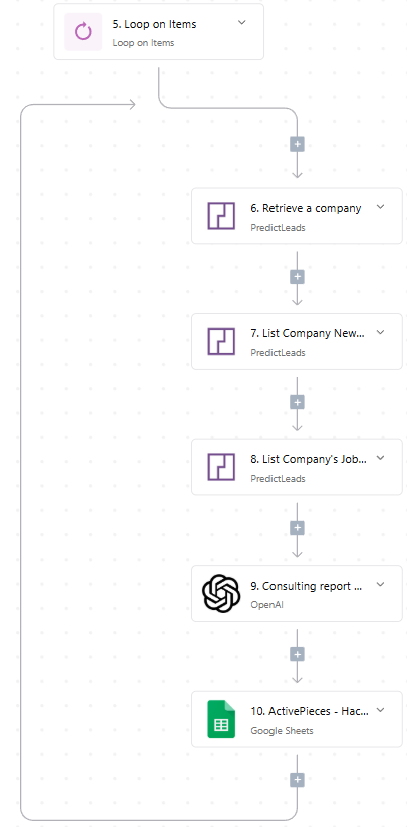
Activepieces is a good starting point for teams that want open-source no-code automation. The PredictLeads Activepieces integration lets teams use PredictLeads data inside workflows without building everything from scratch.
Example Activepieces workflows:
- Enrich a new company domain when it appears in a spreadsheet or CRM.
- Post to Slack when a target account adds several new job openings.
- Send a funding event or company news event to an account owner.
- Use OpenAI to summarize PredictLeads company signals into a sales research brief.
Common PredictLeads actions include listing companies, listing job openings, getting a company by domain, retrieving companies by technology, getting news events, listing technologies by domain, listing connections, and making custom API calls.
2. n8n for Technical PredictLeads Workflows
n8n works well when teams need more control over workflow logic. It is useful for teams that want branching, filtering, API calls, transformations, and more technical automation patterns.
Example n8n workflows with PredictLeads:
- Find companies hiring for AI engineers, data engineers, or security roles.
- Filter companies by technology stack and route matching accounts to a CRM.
- Monitor portfolio companies for hiring spikes, funding events, and company news.
- Use PredictLeads data as context for an AI research agent.
n8n is a strong fit for technical GTM, RevOps, and data teams that want more control than a simple app connector usually provides.
3. Make for Visual GTM Workflows
Make is useful when teams want visual workflow automation. PredictLeads data can feed Make scenarios that update CRMs, spreadsheets, dashboards, alerts, and sales workflows.
Example Make workflows with PredictLeads:
- Pull new job openings and check whether they match your ICP.
- Watch for technology detections on target accounts.
- Create dashboards for companies hiring in specific roles or regions.
- Trigger account alerts when PredictLeads detects relevant company news.
For more detail, see PredictLeads x Make: Automate Company Data Across Your Stack.
4. Zapier for Simple PredictLeads Automation
Zapier is often the simplest option for teams that want to connect apps quickly. It works best for straightforward workflows where a signal in one app should create an action in another app.
Example Zapier workflows with PredictLeads:
- Add new PredictLeads job openings to Google Sheets.
- Send high-fit accounts to HubSpot, Salesforce, Notion, or Airtable.
- Create Slack notifications when a target company appears in PredictLeads News Events.
- Trigger an email or task when a company matches a hiring or technology condition.
Zapier is a good fit when the workflow is simple and speed matters more than advanced logic.
5. Bardeen for Browser-Based AI Workflows
Bardeen automates browser-based workflows. It can help teams move faster when researching companies, building prospect lists, enriching accounts, or preparing outreach from the browser.
Example Bardeen workflows with PredictLeads:
- Enrich a list of companies found during browser research.
- Build prospect lists based on hiring activity or company signals.
- Generate outreach context using PredictLeads company data.
- Turn company research into CRM notes or personalized email drafts.
Example PredictLeads AI Automation Workflows
| Workflow | PredictLeads signal | Automation output |
|---|---|---|
| Account enrichment | Company profile, technologies, jobs | Update CRM or spreadsheet |
| Hiring signal alert | New job openings | Slack alert or sales task |
| News event monitoring | Funding, partnership, acquisition, product launch | Account owner notification |
| Technology-based targeting | Technology detections by domain | Segment or campaign list |
| AI sales research | Company signals, jobs, news, tech stack | Research brief or outreach prompt |
| Lookalike prospecting | Similar companies | New account list |
Does PredictLeads Build Chatbots?
No. PredictLeads does not primarily build conversational AI chatbots. PredictLeads provides structured company intelligence data that chatbots, AI agents, and automation tools can use as context.
That distinction matters. A chatbot can write a message, but it needs reliable context to know whether a company is hiring, expanding, raising funding, changing technologies, launching products, or showing other buying signals. PredictLeads supplies that company context.
FAQ
What is PredictLeads AI automation?
PredictLeads AI automation means connecting PredictLeads company data with AI agents or automation tools so workflows can use real company signals such as job openings, news events, technologies, funding, and similar companies.
Which tools can connect with PredictLeads?
Teams can connect PredictLeads with tools such as Activepieces, n8n, Make, Zapier, Bardeen, CRMs, spreadsheets, Slack, and custom applications through integrations or API workflows.
Can PredictLeads help automate GTM workflows?
Yes. PredictLeads can help automate GTM workflows by supplying structured company data for account enrichment, lead scoring, sales alerts, company monitoring, prospect research, and outbound personalization.
Can PredictLeads reduce manual research work?
Yes. PredictLeads can reduce manual research by automatically surfacing company signals such as hiring activity, technology usage, funding events, company news, and similar companies inside the tools where teams already work.
Where can I find PredictLeads API documentation?
You can find PredictLeads API documentation at docs.predictleads.com/v3. The documentation explains available endpoints, authentication, parameters, and response formats.