
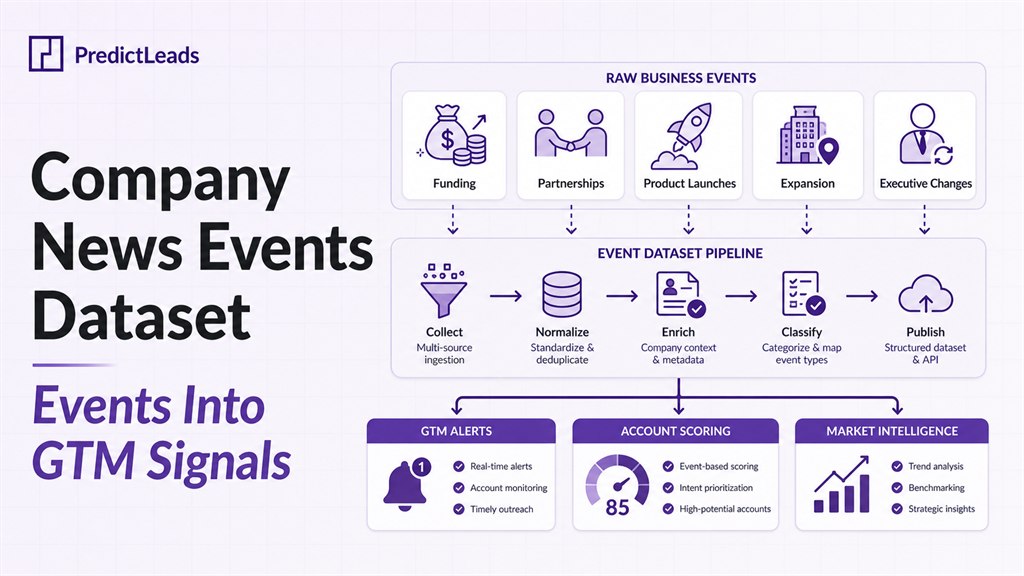
A company news events dataset turns business news into structured signals that teams can filter, score, and use in GTM workflows. Instead of reading articles manually, teams can work with categorized events such as funding, partnerships, product launches, acquisitions, executive changes, and expansion activity.
This matters because company events often reveal timing. A business that launches a product, opens a new market, raises funding, or announces a partnership may have new priorities and new needs.
This guide explains how company news events datasets work and how GTM teams can turn events into sales, marketing, and account monitoring signals.
Quick Answer
A company news events dataset is structured business-event data tied to company records. Instead of returning raw articles, it classifies events like funding, partnerships, product launches, acquisitions, expansion, and leadership changes so teams can use them in alerts, scoring, enrichment, and market intelligence workflows.
Data Fields Included
| Field type | Examples | How teams use it |
|---|---|---|
| Event classification | Funding, partnership, product launch, acquisition, expansion, executive change | Route different events to the right GTM or intelligence workflow. |
| Company identity | Company name, domain, related entities | Match events to accounts, CRM records, watchlists, or data products. |
| Source context | Source URL, event date, summary | Verify the event and give teams enough context to act. |
| Workflow fields | Category, timestamp, related companies, signal type | Power alerts, lead scoring, account monitoring, and market maps. |
Related Reading
- Company News Data vs News APIs
- Company News Data for Sales Triggers
- PredictLeads News Event Categories Guide
- News Events Dataset for Market Intelligence Workflows
- Company News Events for Strategic Market Intelligence
- Top Company News Data Providers in 2026
What Is a Company News Events Dataset?
A company news events dataset contains structured records about meaningful business events. Each record usually connects an event to a company, date, source, category, and supporting context.
- event category
- company domain
- event date
- source URL
- summary or context
- related entities
PredictLeads explains its event taxonomy in PredictLeads News Event Categories.
Why Structured Events Beat Raw News
Raw news is useful for reading, but it is difficult to use in software workflows. A GTM team does not just need articles. It needs structured signals that can feed alerts, scoring, enrichment, and routing.
Structured events make it easier to answer questions such as:
- Which target accounts recently raised funding?
- Which companies announced new partnerships?
- Which accounts launched products in a specific market?
- Which companies are expanding operations?
- Which events should trigger sales outreach?
For a comparison with raw news sources, read Company News Data vs News APIs.
How GTM Teams Use Company News Events Dataset
Sales triggers
Events can trigger timely sales outreach. Funding, expansion, product launches, and partnerships often create a reason to reach out with a relevant message.
See How to Use Company News Data for Sales Triggers and Lead Scoring for a deeper workflow.
Account monitoring
Customer success and sales teams can monitor key accounts for meaningful changes. When an account announces an acquisition, partnership, product expansion, or leadership change, the team can respond quickly.
PredictLeads covers this in How to Track Company News Alerts for Sales and Account Monitoring.
Market intelligence
News events can also support market intelligence. Teams can track which companies are expanding, which competitors are moving, and which categories show more activity.
For a broader view, see PredictLeads News Events Dataset for Real-Time Market Intelligence.
Important Event Categories to Track
- Funding: shows new budget, growth plans, and investor confidence.
- Partnerships: reveals ecosystem movement and strategic priorities.
- Product launches: signals GTM activity and market focus.
- Expansion: shows new geographies, offices, or business lines.
- Acquisitions: indicates strategic change and integration needs.
- Executive changes: can create new priorities and vendor reviews.
The best categories depend on the product and market. A data vendor may care about funding, product launches, and hiring. A consulting firm may care about expansion and leadership changes. A platform company may care about partnerships and technology shifts.
Final Thoughts on Company News Events Dataset
A company news events dataset helps teams move from manual news monitoring to structured GTM intelligence. It turns business events into data that teams can use for alerts, scoring, outreach, and market analysis.
PredictLeads provides structured news events that help sales, marketing, data, and product teams understand what companies are doing in real time.