
If you want company news data, the first question is: do you want articles, or do you want structured company events?
Because those are very different things.
A news API can give you articles that mention a company. That is useful, but it can also get messy fast. If you are building a sales trigger workflow, market intelligence tool, investment research process, or company enrichment product, you probably do not just want “10 links that mention Stripe.”
You want something more like:
Stripe announced a partnership.
Found on this date.
Source URL here.
Event category: partnership.
Company domain: stripe.com.
Connected company record: yes.
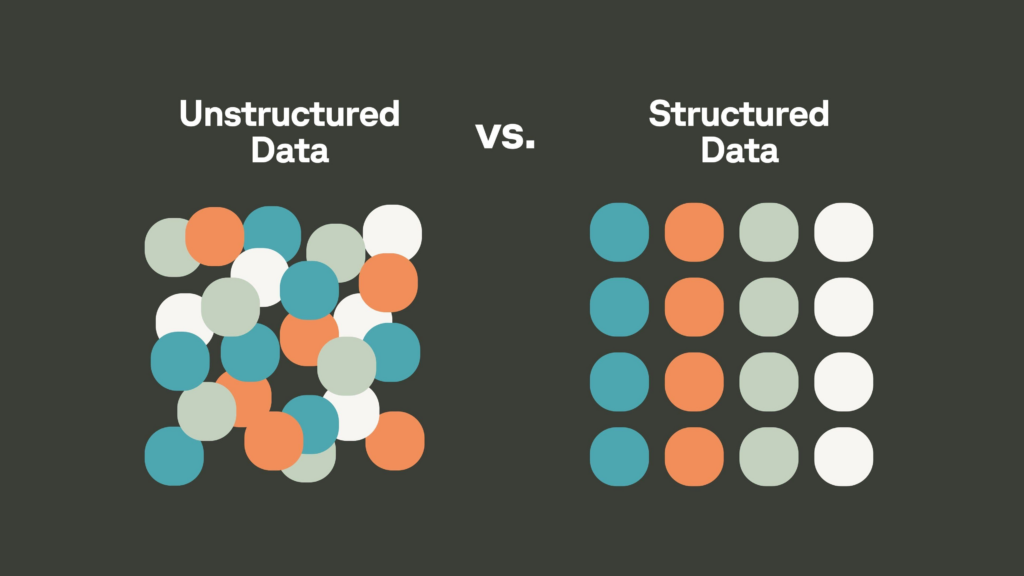
That is the difference between raw news and usable company news data.
The main ways to get company news data
There are a few common options.
1. Use a normal news API
This is the obvious starting point.
A general news API can usually give you:
- Article title
- Source
- URL
- Publish date
- Snippet
- Keyword match
- Language or region
This works fine if your goal is media monitoring or search.
The problem is that most news APIs are article-first. They are good at saying, “Here is an article that mentions Company X.” They are usually less good at saying, “Company X launched a product,” “Company X raised funding,” or “Company X expanded into Germany.”
For business data, that gap matters.
A company being mentioned in an article is not the same as a company doing something worth acting on.
2. Monitor company websites
A lot of useful company news never shows up in mainstream media.
Companies publish updates on:
- Newsroom pages
- Press pages
- Blogs
- Product update pages
- Partner pages
- Customer story pages
- Investor relations pages
- Careers pages
This is especially true for B2B companies. A small SaaS company might announce a major integration or customer win on its own blog, and no journalist will ever cover it.
So yes, monitoring company websites can be very valuable.
But doing it yourself is annoying at scale.
Every website is different. Some have clean press pages. Others bury important updates in blog posts. URLs change without warning. Messy HTML can make extraction unreliable. Duplicate posts show up more often than you’d expect. And plenty of companies publish five different kinds of content in the same feed.
If you are tracking 50 companies, maybe you can hack something together.
If you are tracking 50,000 or 5 million companies, you probably do not want to own that whole pipeline.
3. Use press release feeds
Press release feeds are useful for official announcements.
They can be good for:
- Funding announcements
- Executive hires
- Product launches
- Partnerships
- Acquisitions
- Expansion news
- Corporate milestones
The upside is that press releases are usually formal and easy to understand.
The downside is that press releases are incomplete. Not every company uses them. Not every meaningful business event gets a press release. And some press releases are basically marketing fog with a headline attached.
Good source, but not enough by itself.
4. Scrape the web yourself
You can build your own company news pipeline.
In theory, it looks like this:
- Start with a list of company domains.
- Crawl their sites.
- Extract page text.
- Detect new pages or changed pages.
- Classify the content.
- Match it back to the right company.
- Deduplicate repeated announcements.
- Store the event.
- Make it searchable or accessible through an API.
This gives you control.
It also gives you a lot of maintenance work.
You need to deal with broken pages, weird site structures, duplicate posts, company name ambiguity, crawler rules, language issues, extraction quality, event classification, and freshness.
Building this yourself makes sense if company news data is a core part of your product.
For most teams, it is a distraction.
5. Use structured company event data
This is usually what people actually want when they ask for company news data at scale.
Structured company event data is not just a pile of links. It is business news turned into usable records.
A good record should tell you:
- Which company the event is about
- What happened
- What type of event it is
- When it was found
- Where it came from
- Which source supports it
- Which company profile or domain it maps to
This is much easier to use in a CRM, data warehouse, sales workflow, investment model, enrichment pipeline, or AI app.
Instead of parsing raw articles yourself, you can work with clean event types like:
- Product launch
- Partnership
- Expansion
- Acquisition
- Funding
- Leadership change
- New customer
- Vendor relationship
- Award
- Event
- Market entry
That structure is the whole point.
Why raw news is harder than it looks
The annoying part is not finding articles.
The annoying part is figuring out what the article actually means.
For example:
- Is the article actually about the company, or does it only mention it?
- Is this the right company, or another company with the same name?
- Did something happen, or is this just commentary?
- Is this a new event, or a duplicate of an older announcement?
- Is the company the buyer, seller, customer, vendor, partner, investor, or target?
- Is this useful enough to trigger a workflow?
That is where a lot of DIY systems get painful.
Company names are ambiguous. Articles are noisy. Sources repeat each other. Event types are not always obvious. And if you are trying to automate decisions, “probably about the right company” is not good enough.
If you want this through an API
For most technical teams, the cleanest setup is a company news API.
A useful company news API should let you do things like:
- Get news events for a specific company
- Search across news events
- Filter by event type
- Filter by found date
- Filter by company location
- Pull a specific event by ID
- Sync data into your warehouse or CRM
- Trigger alerts when new events match your criteria
For example, PredictLeads has a News Events Dataset available through a RESTful JSON API.
Example endpoints include:
Dodaj v klepet
GET /companies/{company_id_or_domain}/news_events GET /news_events/{id} GET /discover/news_events
So you can either look up news events for one company or discover events across many companies.
PredictLeads also supports API, flat files, and webhooks, which matters because not every team wants to consume data the same way.
What can you use company news data for?
A few common use cases:
Sales triggers
This is probably the easiest use case to understand.
You want to know when a target account does something that makes outreach more relevant.
Examples:
- They raised funding.
- They launched a new product.
- They expanded into a new region.
- They announced a partnership.
- They hired a new executive.
- They opened a new office.
- They announced a major customer.
That kind of event gives sales teams a reason to reach out that is not just “checking in.”
Market intelligence
Company news data is also useful for watching a market.
You can track:
- Who is launching products
- Who is partnering with whom
- Which companies are expanding
- Which competitors are gaining customers
- Which categories are heating up
- Which regions are seeing activity
Doing that manually is possible for a tiny market. It is not fun across thousands of companies.
Investment research
Investors can use company events to track momentum.
Funding is the obvious one, but there are other signals too:
- Hiring activity
- Partnerships
- Product launches
- Geographic expansion
- Customer announcements
- Acquisitions
- Leadership changes
One event may not mean much. Patterns across time can be useful.
Data enrichment
If you have company profiles in a product or database, recent news events make those profiles more useful.
A static company profile tells you what a company is.
Recent event data tells you what changed.
That is a big difference.
AI apps
AI tools are only as good as the context you give them.
If you are building an AI sales assistant, research tool, or company intelligence product, structured company events can give the model grounded, recent facts.
That is much better than asking an AI model to guess based on stale or vague context.
What should you look for in a provider?
If you are comparing company news data providers, I would look for these things:
- Does it give structured events, or just article links?
- Does it map events to company domains or IDs?
- Does it include source URLs?
- Does it support event categories?
- Can you filter by date, type, and location?
- Can you retrieve events for one company?
- Can you discover events across many companies?
- Does it support API access?
- Are flat files or webhooks available?
- Does it work with other company datasets?
- Is the data usable without a huge cleanup process?
The best provider is not necessarily the one with the most articles.
It is the one that gives you data you can actually use.
A note on PredictLeads
PredictLeads tracks structured company news events, not just article mentions.
According to its local Knowledge Base updated in May 2026, PredictLeads has detected 9.3 million news events since 2016, including 1.2 million news events in the last year.
It also tracks 120 million companies, which helps connect news events to actual company profiles.
The News Events Dataset is meant for use cases like:
- Company news tracking
- Sales triggers
- Market intelligence
- Partnerships
- Product launches
- Expansions
- Acquisitions
- Leadership changes
And you can access it through API, flat files, or webhooks.
So, what is the best way?
If you just want to read news about a few companies, use Google Alerts, RSS, or a basic news API.
If you want to build something reliable on top of company news data, use structured company event data.
That means you want records that say:
- This company did this thing.
- This is the event type.
- This is when it was found.
- This is the source.
- This is the company it maps to.
- This is how you can retrieve or filter it.
That is what turns company news from “a bunch of links” into actual business intelligence.
FAQ
Can I get company news data for free?
For a small number of companies, yes. You can use search alerts, RSS feeds, press pages, and manual tracking. But free methods usually become painful when you need scale, structure, freshness, or company matching.
Is a news API enough?
Sometimes. If you only need articles, a news API may be enough. If you need company events for sales triggers, enrichment, analytics, or AI workflows, you probably need structured event data.
What is the difference between company news and company events?
Company news is often raw content. Company events are structured business signals extracted from that content. The event tells you what happened, who it happened to, and how it should be categorized.
How do I get company news data into my CRM?
The usual way is through an API, flat file sync, or webhook. You match events to company domains or IDs, then push relevant events into account records, alerts, lead scores, or sales workflows.
What company news events are useful for sales?
Funding, expansion, partnerships, product launches, new executives, acquisitions, new customers, and hiring growth are all useful sales triggers.
Does PredictLeads offer company news data?
Yes. PredictLeads provides structured company news events through its News Events Dataset, with access through API, flat files, and webhooks.
Want company news data you can actually use?
Explore PredictLeads’ structured News Events Dataset to get company-level events through API, flat files, or webhooks.