
A company data API is often the first delivery method teams think about when they want to enrich accounts, score leads, or power GTM workflows. APIs are flexible, fast, and easy to connect to products and internal tools. But an API is not always the only answer.
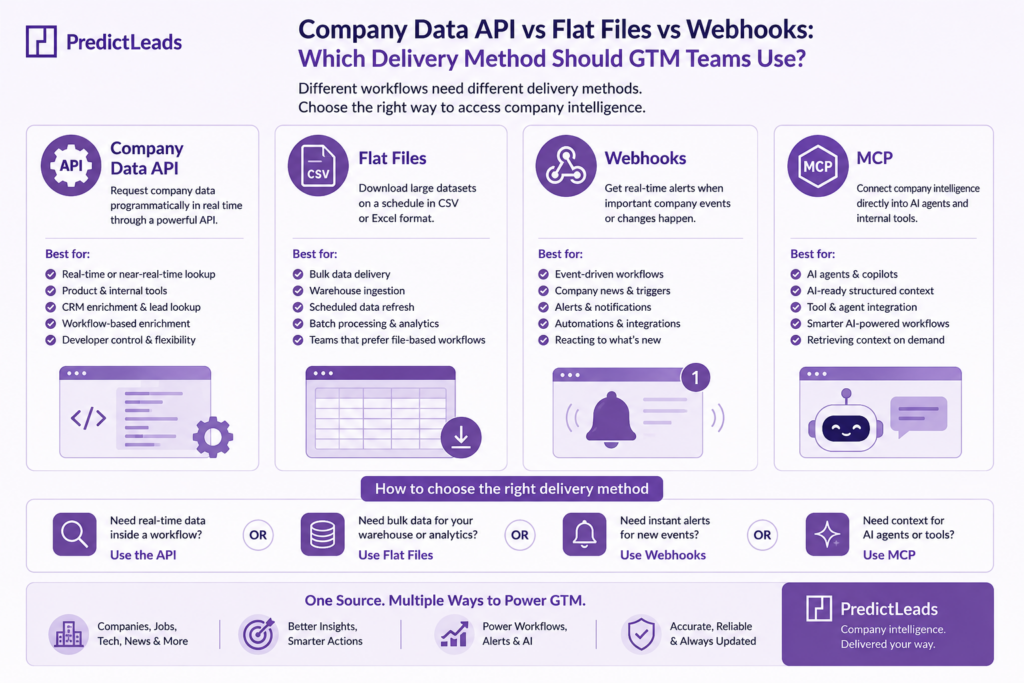
For many B2B teams, the best setup may include a company data API, flat files, webhooks, and MCP depending on how the data will be used. The right delivery method depends on workflow, data volume, refresh needs, and who will consume the data.
What is a company data API?
A company data API lets teams request structured company information programmatically. For example, a system can send a company domain and receive enriched company data, job openings, technology signals, news events, similar companies, or customer relationship context.
APIs are useful when teams need data inside live workflows. A CRM enrichment process, sales intelligence product, account scoring engine, or internal research tool can call an API when it needs updated company information.
When to use a company data API
A company data API is usually the best fit when data needs to be requested on demand. It works well for product experiences, internal tools, CRM actions, lead enrichment, and account lookup workflows.
For example, a sales tool might call the Companies Dataset to enrich a company profile, then combine it with the Job Openings Dataset to show whether the account is currently hiring. A data product might use the Technologies Dataset to show which companies use specific tools.
Use a company data API when:
- You need real-time or near-real-time lookup.
- Your product or internal system needs structured responses.
- You want enrichment to happen inside a workflow.
- You need flexibility across different datasets.
- Your developers want direct control over requests and responses.
When flat files are better
Flat files are useful when teams need larger batches of data. A data team may prefer scheduled files for warehouse ingestion, analytics, matching, or offline modeling. Flat files can also be easier when the goal is to refresh a full account universe rather than enrich one company at a time.
For example, a RevOps team might use flat files to refresh target account data every week. A data science team might use flat files to build a model that combines firmographics, hiring signals, company news, and technographics.
Flat files are a good choice when:
- You need bulk data delivery.
- You want to load data into a warehouse.
- Your workflow runs on a schedule.
- You need repeatable batch processing.
- Your team prefers files over API integration.
When webhooks make sense
Webhooks are useful when teams want to react to new events. Instead of asking for data repeatedly, a webhook can send information when something important happens.
This is especially useful for company news and trigger-based workflows. A team might want alerts when a target account announces funding, launches a product, expands into a new market, or posts jobs related to a specific department.
The News Events Dataset is a strong fit for webhook-driven workflows because company events often matter most when they are fresh. Sales and marketing teams can use those signals for outreach, account monitoring, and lead scoring.
Where MCP fits
MCP is useful when teams want AI agents and internal tools to access company intelligence in a structured way. Instead of manually copying data into prompts, MCP can help an AI workflow retrieve relevant company context when it needs it.
For example, an AI sales agent could use company data to prepare an account brief, summarize hiring activity, identify relevant sales triggers, or explain why a company matches an ideal customer profile.
Interested in knowing how to integrate PredictLeads and MCP? Find it here: How to Integrate PredictLeads MCP: A Step-by-Step Guide
How to choose the right delivery method
The best choice depends on the workflow. If the data powers a live product or enrichment request, start with a company data API. If the data feeds a warehouse, use flat files. If the workflow depends on fresh events, use webhooks. If AI agents need company context, MCP can become an important layer.
Most mature GTM teams eventually use more than one delivery method. The same company intelligence can support product workflows, data pipelines, sales alerts, and AI research. The delivery method should match the job.
FAQ
What is the best delivery method for company data?
The best delivery method depends on the workflow. APIs work best for real-time enrichment, flat files for bulk data delivery, webhooks for fresh event alerts, and MCP for AI workflows.
When should GTM teams use a company data API?
Use a company data API when you need on-demand company enrichment inside a CRM, product, lead scoring system, or internal tool.
When are flat files better than APIs?
Flat files are better when teams need large batches of data for warehouse ingestion, scheduled refreshes, analytics, or offline modeling.
When should teams use webhooks?
Use webhooks when new company events should trigger alerts or automations, such as funding announcements, hiring spikes, product launches, partnerships, or expansion signals.
Where does MCP fit?
MCP helps AI agents and internal tools access structured company intelligence, so they can create account briefs, summarize signals, and support GTM workflows.
Final takeaway
A company data API gives teams flexibility, but API delivery is only one part of the picture. Flat files, webhooks, and MCP can each make company intelligence more useful depending on how the data enters the workflow.
PredictLeads supports teams that need company intelligence across use cases, including enrichment, sales triggers, account scoring, AI workflows, and product experiences. Start by choosing the signal you need, then choose the delivery method that makes that signal easiest to use.