
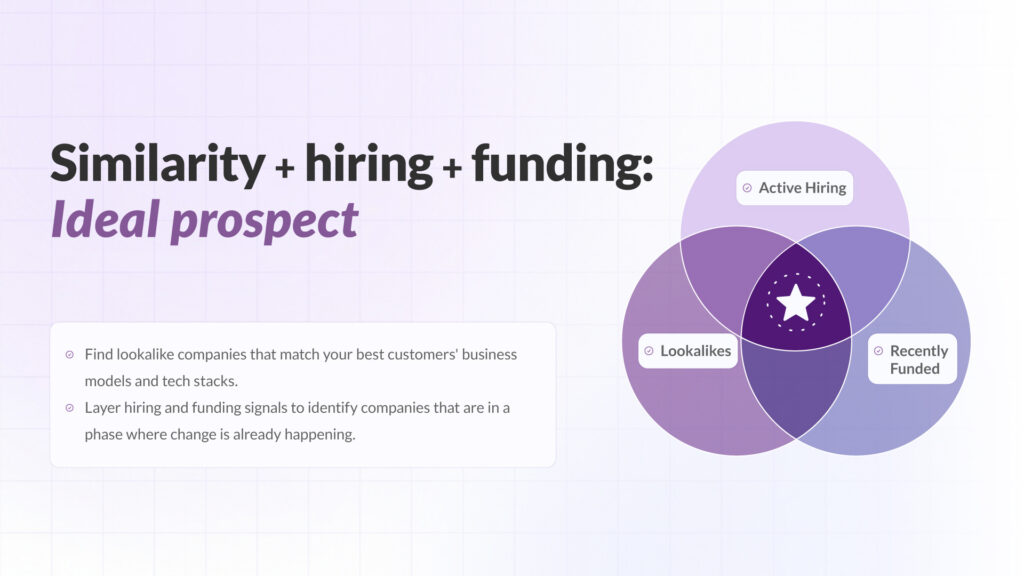
Lookalike companies are one of the best starting points for building a high-quality target account list. If your best customers share similar business models, hiring patterns, technology stacks, funding stages, or growth signals, you can use those patterns to find more companies that are likely to be a strong fit.
But similarity alone is not enough. The best prospecting lists combine lookalike companies with timing signals, especially active hiring and recent funding. That combination helps you find accounts that look like your best customers and are also showing signs of growth, budget, and change.
This guide explains how to find lookalike companies, filter them by hiring activity and funding events, and turn them into a practical list for outbound, ABM, partnerships, or CRM enrichment.
What are lookalike companies?
Lookalike companies are businesses that resemble your best customers based on meaningful attributes. These can include industry, company size, business model, technology stack, hiring behavior, funding stage, geography, customer type, and growth trajectory.
A basic lookalike list might use simple filters like industry and headcount. A stronger list uses dynamic signals to identify companies that are not only similar, but also active and likely to have a current need.
| Signal | What it tells you | Why it matters |
|---|---|---|
| Industry and business model | Basic fit | Helps match your ICP |
| Technology stack | Operational setup | Shows compatibility and workflow fit |
| Hiring activity | Current priorities | Reveals teams that are growing or under pressure |
| Recent funding | Budget and growth stage | Indicates capacity to invest |
| Company news events | Strategic movement | Shows expansion, launches, partnerships, or leadership changes |
Why static ICP filters are not enough
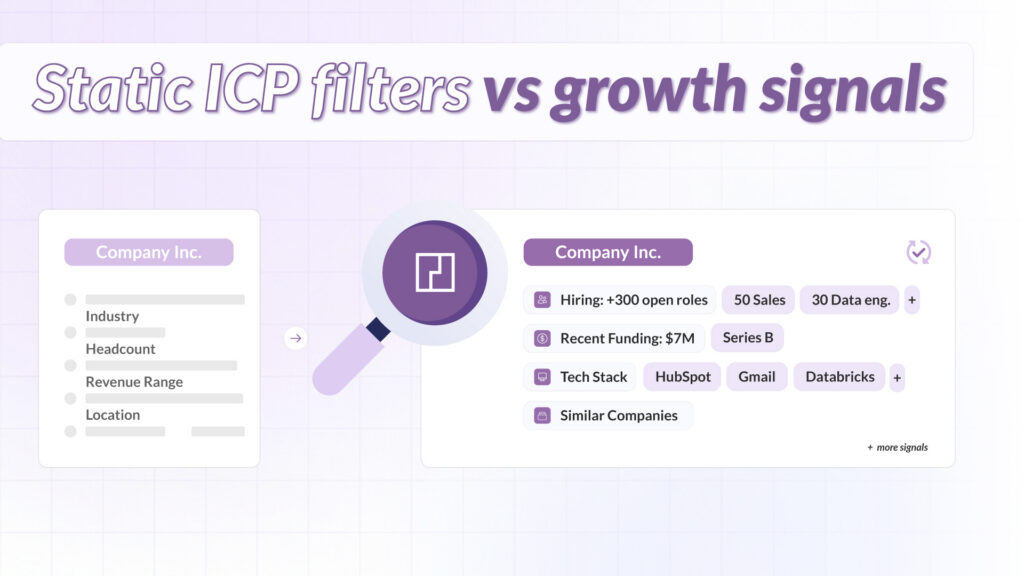
Most go-to-market teams start with a sensible ICP: industry, company size, geography, revenue, and maybe a few technology filters. That is a useful baseline, but it does not tell you whether an account is ready to act.
Two companies can look identical in a database and still be in completely different situations:
- One company may be freezing hiring and cutting spend.
- Another may be hiring aggressively, expanding into new markets, and rolling out new systems.
If you only use static filters, both accounts may look equally good. When you add hiring, funding, and other growth signals, you can separate companies that merely fit your ICP from lookalike companies that are actually in motion.
Why hiring and funding improve lookalike company lists
Hiring and funding are useful because they indicate change. A company that is actively hiring has approved budget and operational needs. A company that recently raised funding often has more capacity to invest in people, tools, infrastructure, and growth.
Hiring shows company priorities
Job postings reveal what a company is building next. Sales hiring may point to go-to-market expansion. Data engineering roles may indicate infrastructure investment. Security and compliance roles may signal enterprise readiness.
Funding shows budget and timing
Funding does not guarantee buying intent, but it often changes a company’s operating mode. After a raise, teams may accelerate hiring, enter new markets, upgrade tooling, or professionalize operations.
Similarity plus timing creates better target accounts
Similarity finds the right type of company. Hiring and funding help identify the right moment. Together, they create a list that is more relevant than a generic ICP export and more actionable than a plain lookalike audience.
How to find lookalike companies step by step
This workflow helps you find lookalike companies and prioritize the ones most likely to be worth sales or marketing attention.
1. Start with your best customers
Start with customers that represent success in practice, not just logo size. Good seed accounts usually have strong retention, short ramp time, clear product value, and a repeatable use case.
- Which customers expanded after the first deal?
- Which accounts had the shortest sales cycle?
- Which customers adopted the product quickly?
- Which use cases are easiest to repeat?
2. Build a richer similarity model
Do not stop at industry and size. Strong lookalike companies usually match across several dimensions:
- Industry and sub-industry
- Business model
- Technology stack
- Hiring patterns
- Growth stage
- Customer type or market segment
3. Filter for active hiring
Reduce noise by filtering the list to companies with active job openings. Then go deeper by looking at department, role type, seniority, location, and hiring velocity.
A company hiring across relevant teams is usually more interesting than a company with one isolated job post. Hiring momentum helps show whether the account is actively changing.
Related guide: How to Use Job Postings Data to Identify Company Growth and Buying Intent.
4. Overlay recent funding events
Next, add recent financing events. A funding window of the last 6 to 12 months can help identify accounts with new budget, expansion pressure, or scaling plans.
Segment by funding stage so your outreach matches the company’s situation. A seed-stage company and a Series C company may both be recently funded, but they usually have different buying motions and operational needs.
5. Check company news and growth events
Use news events to validate that the growth story is real. Look for market expansion, product launches, leadership hires, partnerships, acquisitions, or major customer announcements.
Related guide: PredictLeads News Event Categories: A Guide to Company Signals.
6. Score and tier the list
Do not send a giant undifferentiated list to sales. Score your lookalike companies so the team knows where to start.
| Score component | Example question |
|---|---|
| Similarity score | How closely does this company match your best customers? |
| Hiring momentum | Is the company actively hiring in relevant departments? |
| Funding recency | Has the company raised funding recently? |
| Tech fit | Does the company use compatible or relevant technologies? |
| Growth events | Are there recent expansion, launch, partnership, or leadership signals? |
7. Push the best accounts into your CRM
Once the list is scored, push the best accounts into your CRM or sales engagement workflow with the signals attached. Reps should know why an account is similar, why it is timely, and which trigger makes it worth contacting now.
Example lookalike companies workflow
A practical workflow could look like this:
- Choose 20 best customers as seed accounts.
- Find similar companies based on industry, business model, technology stack, and growth patterns.
- Filter for accounts with active hiring in relevant departments.
- Prioritize companies that raised funding in the last 6 to 12 months.
- Add news events, technology adoption, and connection signals.
- Score accounts into Tier 1, Tier 2, and Tier 3.
- Send the highest-priority accounts to sales with the reason for outreach.
Where PredictLeads fits in
PredictLeads helps teams find lookalike companies and prioritize them with real company signals. Instead of stitching together separate tools for similarity, hiring, funding, news, technologies, and connections, teams can use structured company data from PredictLeads inside their existing GTM workflows.
- Similar Companies: Find accounts that resemble your best customers.
- Job Openings: Identify companies with active hiring momentum.
- Financing Events: Track recently funded companies.
- News Events: Monitor launches, expansions, partnerships, and leadership changes.
- Technology Detections: Segment companies by tools and technology adoption.
- Connections: Find investors, partners, and warm-path relationships.
If you want to build a signal-based target account list, explore PredictLeads or review the PredictLeads API docs.
FAQ about lookalike companies
What are lookalike companies?
Lookalike companies are businesses that resemble your best customers based on shared attributes such as industry, business model, technology stack, hiring patterns, funding stage, growth signals, or customer type.
How do you find lookalike companies?
You can find lookalike companies by starting with your best customers, identifying shared traits, generating a similarity list, and then filtering by signals such as active hiring, recent funding, technologies, and company news.
Why add hiring data to lookalike company lists?
Hiring data shows which companies are actively investing in teams and capabilities. It helps separate static lookalike companies from accounts that are currently growing or changing.
Why add funding data to lookalike company lists?
Recent funding can indicate new budget, expansion pressure, and a stronger likelihood that the company is investing in people, tools, infrastructure, or go-to-market growth.
Are lookalike companies useful for ABM?
Yes. Lookalike companies are useful for ABM because they help teams expand from proven customer patterns into new accounts that share similar traits and show timely buying signals.
Conclusion
Finding companies similar to your best customers is useful, but the strongest lists go further. The best target accounts are lookalike companies that also show active hiring, recent funding, relevant technology signals, and other signs of real company movement.
When you combine similarity with timing, you give sales and marketing teams a better reason to prioritize an account and a better reason to start a conversation now.