
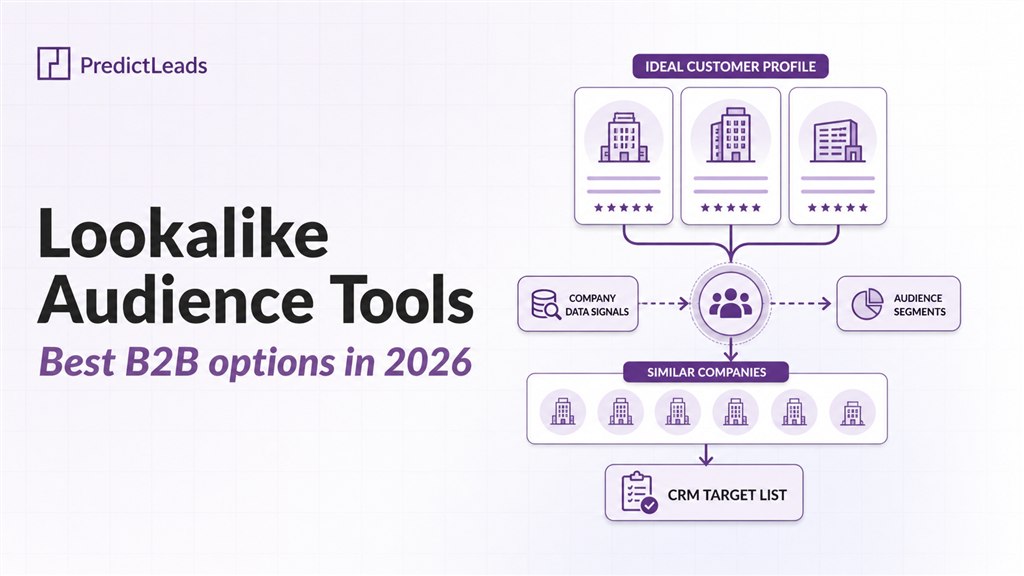
Company lookalike tools help sales, marketing, RevOps, data, and AI teams find company lookalikes and similar companies based on their best customers, target accounts, competitors, or ideal customer profile.
The best company lookalike tools in 2026 include PredictLeads, Ocean.io, ZoomInfo, Landbase, Lusha, and DeepLeads. These tools help teams discover similar companies, build lookalike account lists, expand their total addressable market, and power GTM workflows.
But not every company lookalike tool works the same way. Some providers offer structured similar-company datasets through APIs. Others provide UI-based search, sales intelligence workflows, or AI-generated audiences.
In this guide, we compare the top company lookalike tools based on how they identify similar companies, what kind of output they provide, and which use cases they fit best.
What are company lookalike tools?
Company lookalike tools help you find businesses that resemble a seed company or a group of companies you already care about.
For example, a sales team might upload a list of its best customers and look for more companies with similar characteristics. A data team might use a company lookalike API to enrich a product with similar-company recommendations. A marketing team might use lookalike companies to expand an account-based marketing audience.
The input is usually one or more of the following:
- a company domain
- a company name
- a list of existing customers
- a target account list
- an ideal customer profile
The output is usually a list of similar companies, often with extra fields such as similarity scores, company attributes, firmographics, contact data, or reasons explaining why the companies are similar.
The main difference between providers is how they calculate similarity. Some tools rely mostly on company websites and semantic analysis. Others use firmographics, technographics, sales intelligence data, or structured datasets. The best choice depends on whether you need a user interface for prospecting, an API for similar-company data, or a broader sales intelligence platform.
Quick comparison of the best company lookalike tools
| Provider | Best for | Provider type | Main tradeoff |
| PredictLeads | Similar companies dataset, API access, GTM workflows, AI agents, and data products | Similar companies dataset | Less focused on a self-serve prospecting UI |
| Ocean.io | UI-based company lookalike search and ICP discovery | Lookalike search platform | Less focused on raw dataset delivery |
| ZoomInfo | Enterprise users who want company lookalikes inside a large B2B database | Sales intelligence platform with lookalikes API | Works best if you already use the ZoomInfo ecosystem |
| Landbase | AI-generated GTM audiences and scored lookalike accounts | AI GTM platform | More platform-led than dataset-led |
| Lusha | Sales prospecting with company and contact lookalikes | Sales intelligence and prospecting platform | More focused on prospecting than standalone similarity data |
| DeepLeads | Lightweight lookalike discovery from example company websites | AI lookalike finder | Less established for enterprise data workflows |
1. PredictLeads – Best for similar-company datasets and API workflows
PredictLeads offers a Similar Companies Dataset for finding businesses similar to target accounts, customers, competitors, or ideal customer profiles.
The dataset is built for teams that need structured similar-company data rather than only a prospecting interface. It can be used in sales workflows, GTM systems, data products, AI agents, enrichment pipelines, and internal account intelligence tools.
PredictLeads identifies similar companies using website embeddings enriched with broader company intelligence datasets, including technologies, news events, job openings, and other company attributes. The goal is to find meaningful similarities beyond basic filters like industry, company size, or location.
Each match can include a similarity reason, which explains why two companies are considered similar. This makes the data useful not only for discovery, but also for personalization and prioritization.
How it works
PredictLeads Similar Companies Dataset is available for more than 18.5 million companies.
The dataset is built from website embeddings enriched with PredictLeads company intelligence datasets. This helps identify companies that are similar across multiple dimensions, rather than relying only on manual filters, industry categories, company size, or location.
The output can include similar companies, similarity scores, similarity reasons, company attributes, and data that can be used through API or structured delivery.
This makes it useful for teams that want to build company lookalike discovery directly into GTM workflows, internal tools, AI systems, or data products.
Strengths
A few things stand out:
- structured similar-company dataset built for API and data workflows
- broad company coverage across 18.5M+ companies
- similarity reasons included with matches
- uses multiple company intelligence datasets rather than only basic firmographics
- useful for account expansion, sales prospecting, market segmentation, territory planning, lead scoring, and personalized outbound
Because similarity reasons are included, sales and marketing teams can understand why a company is a good match and reference shared characteristics in outreach.
Limitations
PredictLeads is less focused on being a self-serve prospecting UI than tools like Ocean.io or Apollo. If your main goal is to have sales reps manually search for accounts in a web app, a UI-first platform may be easier to adopt.
It is also not a contact database by itself. Teams that need verified emails, phone numbers, or sequencing tools may combine PredictLeads with contact data providers or outbound platforms.
Pricing
PredictLeads pricing typically starts at around $24,000 per year per dataset, with larger deployments reaching up to $150,000 per year depending on scale and data needs.
Pricing generally depends on:
- the number of datasets used
- data volume and delivery method
- level of access such as API, bulk delivery, or real-time updates
In addition to subscription-based pricing, PredictLeads also offers a pay-as-you-go API model, which makes it accessible for smaller teams and more flexible use cases.
This model is particularly useful for:
- early-stage companies
- teams testing specific use cases
- GTM teams enriching accounts on demand
- AI agents or applications that require similar-company data through an API
Compared to general sales intelligence platforms or scraping-based approaches, PredictLeads offers a more structured and predictable way to access company lookalike data, while still retaining flexibility through API-based access.
For smaller-scale or on-demand use cases, API access starts at $40 per month, making it accessible for teams that do not need full dataset subscriptions.
When to use PredictLeads
PredictLeads is a strong fit if you need:
- a similar companies dataset
- company lookalike API access
- similarity scores or similarity reasons
- company recommendations inside a product
- GTM workflows based on target-account similarity
- account expansion from existing customers
- enrichment for AI agents or sales intelligence systems
For teams that need company lookalike data as infrastructure, PredictLeads is usually a better fit than UI-only prospecting tools because it can be used directly in workflows, products, enrichment pipelines, and AI systems.
2. Ocean.io – Best for UI-based company lookalike search
Ocean.io is one of the best-known company lookalike tools for B2B sales and marketing teams. It is built around the idea of helping teams find companies that look like their best customers, target accounts, or companies that match their ideal customer profile.
The main value of Ocean.io is its lookalike search experience. Instead of manually building prospect lists through filters, users can start with a company, domain, or account list and use Ocean.io to discover similar companies. This makes it especially useful for ICP discovery, TAM expansion, account-based marketing, and outbound prospecting.
Ocean.io also offers API access for teams that want to bring company and people lookalikes into their own GTM applications, prospecting platforms, or AI agents. Its API page describes the product as a Lookalike API for companies and people.
How it works
Ocean.io uses AI-powered lookalike search to identify companies that resemble a given seed company or set of accounts. Its lookalike search page says the product analyzes hundreds of millions of company profiles and large amounts of company and people data to support GTM targeting.
In practice, teams can use Ocean.io to:
- find companies similar to existing customers
- discover new accounts in a target market
- expand account lists beyond manual ICP filters
- identify companies for outbound campaigns
- connect lookalike discovery with CRM or GTM workflows
Ocean.io is especially strong when the buyer wants a visual, self-serve workflow for exploring similar companies rather than working directly with a raw dataset.
Strengths
A few things stand out:
- one of the most recognized tools in the company lookalike category
- strong UI for finding similar companies from seed accounts
- useful for ICP discovery and TAM expansion
- supports company and people lookalike use cases
- offers API access for custom GTM applications
- can fit into sales and marketing workflows without heavy engineering work
Ocean.io is a good option for teams that want sales or marketing users to directly explore lookalike companies and build account lists.
Limitations
Ocean.io is more of a lookalike search and prospecting platform than a raw similar-company dataset.
That means it may be less ideal for teams that primarily need bulk delivery, structured data exports, or similar-company data as infrastructure inside a product or AI system. In those cases, a dataset-first provider may be a better fit.
Ocean.io is strongest for account discovery and lookalike search. Teams that need deeper contact coverage, sequencing, or sales engagement may still combine it with tools like Apollo, ZoomInfo, HubSpot, Outreach, or Salesloft.
Pricing
Ocean.io uses a credit-based pricing model.
For monthly subscriptions, the lowest monthly option includes 750 credits and costs $53.25 per month. Credits are used for accessing data such as emails, phone numbers, and enrichment.
Ocean.io also offers a credit purchase option. The minimum purchase is 1,000 credits for $81. This is more flexible than a full subscription, but it is not true pay-as-you-go in the sense of paying per single lookup. Instead, users purchase a block of credits in advance.
A useful advantage is that Ocean.io allows users to export data at no extra cost, which can make it easier to move discovered lookalike companies into a CRM, spreadsheet, or outbound workflow.
Pricing generally depends on:
- number of credits needed
- whether the team chooses a monthly subscription or one-time credit purchase
- use of emails, phone numbers, and enrichment
- export volume
- CRM integrations
- whether API access is needed
Ocean.io can be cost-effective for teams that want a UI-based prospecting and lookalike workflow, especially if they can estimate their monthly credit usage. For teams that need large-scale structured similar-company data or bulk dataset access, a dataset-first provider may be easier to budget and integrate.
When to use Ocean.io
Ocean.io is a strong fit if you need:
- a self-serve tool for finding company lookalikes
- ICP discovery from existing customers
- TAM expansion and account list building
- UI-based exploration of similar companies
- company and people lookalike workflows
- API access for company and people lookalikes
Ocean.io is one of the strongest options if your main goal is to help GTM teams discover similar companies through a dedicated lookalike search platform.
3. ZoomInfo – Best for enterprise lookalikes inside a large B2B database
ZoomInfo is one of the largest B2B sales intelligence platforms, and it is also relevant for company lookalikes because it offers a Find Similar Companies API endpoint.
This makes ZoomInfo different from tools that only support manual filtering. Teams can use ZoomInfo to identify companies similar to a reference company, then continue working with those accounts inside the broader ZoomInfo ecosystem for segmentation, enrichment, prospecting, and sales workflows.
ZoomInfo is especially relevant for enterprise sales and marketing teams that already use ZoomInfo as a system of record for B2B company and contact data.
How it works
ZoomInfo’s Find Similar Companies API returns a ranked list of companies that are similar to a reference company.
According to ZoomInfo’s API documentation, the model uses a semantic representation of company data and analyzes firmographic signals such as industry, revenue range, employee count, and other company attributes. The result is a list of up to 100 similar companies, ordered by similarity score.
In practice, teams can use ZoomInfo lookalikes to:
- find companies similar to existing customers
- expand territory or account lists
- enrich lookalike accounts with firmographics and contacts
- build outbound lists inside ZoomInfo
- combine similarity with filters like industry, location, headcount, revenue, and intent
Strengths
A few things stand out:
- real company lookalikes API, not just manual filtering
- ranked results with similarity scores
- similarity model based on company and firmographic data
- strong fit for teams already using ZoomInfo
- large B2B company and contact database
- useful firmographic enrichment on returned companies
- workflow can continue into ZoomInfo’s broader sales intelligence ecosystem
ZoomInfo is useful when lookalike discovery is only one part of a broader enterprise sales intelligence workflow.
Limitations
ZoomInfo’s lookalike functionality works inside the ZoomInfo ecosystem. That is an advantage for existing ZoomInfo customers, but it can be a limitation for teams that want a standalone similar-companies dataset or more flexible data infrastructure.
The API returns companies from the ZoomInfo database, so the quality and coverage of lookalikes depend on ZoomInfo’s own company universe and data model.
ZoomInfo is also usually more than just a company lookalike tool. Teams evaluating it only for similar-company discovery may be buying into a much broader and more expensive sales intelligence platform than they need.
Pricing
ZoomInfo does not publish simple self-serve pricing for its full platform. Pricing is typically quote-based and depends on the products, seats, credits, data access, integrations, API usage, and contract terms a company needs.
Third-party pricing guides commonly estimate ZoomInfo SalesOS starting at around $15,000 per year, with more advanced plans often around $25,000–$40,000 per year. Larger teams or deployments with additional seats, intent data, enrichment, API access, or other add-ons can reach $60,000+ per year.
For company lookalike use cases, pricing may depend on:
- access to ZoomInfo SalesOS or related products
- number of users
- API access
- export limits or credits
- enrichment volume
- CRM and workflow integrations
- add-ons such as intent data, technographics, or advanced firmographics
Because ZoomInfo is an enterprise sales intelligence platform, it is usually better suited for teams that need company data, contact data, enrichment, prospecting workflows, and lookalikes together.
For smaller teams that only need similar-company data or API-based lookalike results, a dedicated similar-companies dataset or lighter lookalike tool may be easier to budget.
When to use ZoomInfo
ZoomInfo is a strong fit if you need:
- company lookalikes inside a broader sales intelligence platform
- a Find Similar Companies API
- ranked lookalike companies with similarity scores
- firmographic enrichment on returned companies
- company and contact data in the same ecosystem
- account expansion for enterprise sales teams
- workflows that continue into CRM, enrichment, exporting, and outbound prospecting
ZoomInfo is one of the strongest options if your team already uses ZoomInfo and wants company lookalikes as part of a larger enterprise GTM workflow.
4. Landbase – Best for AI-generated GTM lookalike audiences
Landbase is an AI go-to-market platform that includes a dedicated Lookalikes product for finding companies similar to a team’s best customers or target accounts.
Unlike dataset-first providers, Landbase is built around GTM execution. Its lookalike functionality is designed to help teams create scored audiences that can be used for ABM, demand generation, expansion, and outbound campaigns.
This makes Landbase a good fit for teams that want to move from “who looks like our best customers?” to “which companies should we target next, and how do we activate them?”
How it works
Landbase Lookalikes uses AI modeling to identify companies similar to a team’s ideal customer profile or top accounts. Its product page says the model can use signals such as tech stack, hiring velocity, buying signals, behavioral data, and live intent data to create verified lookalike audiences.
In practice, teams can use Landbase to:
- upload top accounts or describe an ideal customer profile
- generate scored lookalike company audiences
- identify net-new accounts for ABM or outbound
- prioritize accounts based on fit and buying signals
- connect lookalike discovery with broader GTM campaign execution
Landbase is more of an AI GTM platform than a standalone similar-companies dataset. The lookalike output is meant to feed sales and marketing campaigns, not just provide raw company similarity data.
Strengths
A few things stand out:
- dedicated Lookalikes product
- AI-generated and scored lookalike audiences
- designed for GTM execution, not only data discovery
- useful for ABM, demand generation, and outbound campaigns
- combines company similarity with buying signals and campaign workflows
- good fit for teams that want an end-to-end GTM platform
Landbase can be useful when lookalike discovery is part of a broader AI-driven sales or marketing motion.
Limitations
Landbase is less focused on raw dataset delivery than a provider like PredictLeads. If your team needs similar-company data through bulk files, APIs, or internal data infrastructure, a dataset-first provider may be easier to integrate.
It is also more platform-led than data-led. That can be a strength if you want campaign execution, but it may be too much if you only need company lookalikes or similarity scores.
Because Landbase combines lookalike modeling with broader GTM automation, buyers should evaluate the full workflow, not just the lookalike feature.
Pricing
Landbase does not publish standard self-serve pricing. Pricing appears to be quote-based and likely depends on the scope of the GTM workflow, number of users, data usage, CRM integrations, campaign volume, and modules enabled.
Third-party estimates often mention Landbase pricing at around $3,000 per month, or roughly $36,000 per year, but this should be treated as an estimate rather than official list pricing.
Pricing may depend on:
- number of users
- lookalike audience volume
- contact and enrichment usage
- campaign execution volume
- CRM and outbound integrations
- AI agents or broader GTM automation features
- onboarding, support, and enterprise requirements
Because Landbase is positioned as an AI GTM platform, the pricing is usually easier to justify when lookalikes are part of a broader campaign execution workflow. If a team only needs similar-company data or lookalike API access, a dedicated dataset provider may be easier to evaluate and budget.
When to use Landbase
Landbase is a strong fit if you need:
- AI-generated lookalike audiences
- scored account lists for GTM campaigns
- lookalikes connected to outbound or ABM workflows
- campaign execution in the same platform
- AI assistance for account targeting and prioritization
- a platform-led approach rather than a raw dataset
Landbase is a good option if your goal is to turn lookalike discovery into GTM execution. If your goal is to access similar-company data directly through datasets or APIs, a dedicated data provider may be a better fit.
5. Lusha – Best for sales prospecting with company and contact lookalikes
Lusha is a sales intelligence and prospecting platform that helps teams find companies and contacts for outbound sales.
It is relevant for company lookalikes because it includes both company lookalikes and contact lookalikes. This makes it useful for teams that want to find similar companies and then quickly identify relevant people at those companies.
Unlike dataset-first providers, Lusha is mainly built for sales prospecting. Its strength is not only helping teams discover similar companies, but also helping them turn those companies into usable prospecting lists with contact data, enrichment, CRM integrations, and workflow features.
How it works
Lusha’s Lookalikes API helps teams discover similar companies and contacts based on existing customers or seed data.
For company lookalikes, Lusha focuses on companies with similar firmographics and characteristics. Its API documentation describes Company Lookalikes as a way to discover companies with similar firmographics and characteristics, while Contact Lookalikes help find similar people based on profile, role, seniority, and industry patterns.
In practice, teams can use Lusha to:
- find companies similar to existing customers
- discover similar contacts and buyer personas
- expand prospecting audiences
- enrich lookalike companies with contact data
- build outbound lists using company and contact data together
- connect prospecting workflows with CRM and sales tools
Lusha is best understood as a sales prospecting platform with lookalike functionality, rather than a standalone similar-companies dataset.
Strengths
A few things stand out:
- supports both company lookalikes and contact lookalikes
- useful for sales prospecting and outbound workflows
- combines lookalikes with contact data and enrichment
- includes platform features for sales teams
- supports CRM integrations and workflow automation
- more accessible pricing than larger enterprise sales intelligence platforms
Lusha is especially useful when the goal is not only to find similar companies, but also to identify relevant contacts at those companies.
Limitations
Lusha’s lookalike functionality is mainly built around sales prospecting workflows.
That means it may be less ideal for teams that need a standalone similar-companies dataset, bulk data delivery, or similarity data as infrastructure inside a product or AI system.
The company lookalike output is also more focused on firmographic similarity and prospecting relevance. For teams that need richer company similarity across multiple datasets, a dedicated similar-company data provider may be a better fit.
Pricing
Lusha uses a credit-based pricing model.
Its public pricing page lists a free plan with 40 credits per month. The lowest paid annual plan, Starter, costs $37.45 per month when billed yearly and includes 4,800 credits per year. The Pro plan costs $52.45 per month when billed yearly and includes 7,200 credits per year. Premium costs $299.95 per month when billed yearly and includes 40,800 credits per year. Lusha also offers a custom Scale plan for larger organizations.
The Starter plan includes contact and company lookalikes, while API access starts on the Pro plan.
Pricing generally depends on:
- number of credits
- number of seats
- API access
- bulk enrichment usage
- contact and company data usage
- buying intent topics
- CRM and workflow integrations
- enterprise features such as SSO, compliance, and dedicated support
Lusha can be cost-effective for teams that want prospecting data, contact enrichment, and lookalikes in one platform. For teams that only need similar-company data without contact enrichment or sales workflow features, a dedicated dataset provider may be easier to evaluate.
When to use Lusha
Lusha is a strong fit if you need:
- company lookalikes and contact lookalikes
- sales prospecting from similar companies
- contact data alongside similar-company discovery
- enrichment for outbound sales teams
- company and people data in the same platform
- CRM and workflow integrations
- a lower-cost alternative to larger enterprise sales intelligence platforms
Lusha is a good option when company lookalikes are part of a prospecting workflow. If your main goal is to use similar-company data inside products, data pipelines, or AI systems, a dataset-first provider may be a better fit.
6. DeepLeads – Best for lightweight lookalike discovery from example websites
DeepLeads is a lightweight company lookalike discovery tool for finding businesses similar to a set of example websites.
It is built around a simple workflow: describe what your company does, provide a few example websites that represent your target market, and receive a list of similar companies. This makes DeepLeads useful for early-stage GTM research, niche prospecting, and quick account discovery when teams do not want to set up a larger sales intelligence platform or data pipeline.
DeepLeads is especially relevant for teams that want a straightforward way to find lookalike companies from examples, rather than manually building searches with filters.
How it works
DeepLeads describes its lookalike workflow in three steps: share what your company does, provide example websites you want to find lookalikes for, and get thousands of similar lookalikes to those example websites. It recommends providing at least three example websites for better results.
In practice, teams can use DeepLeads to:
- find companies similar to example websites
- discover niche prospects in specific markets
- build early account lists for outbound campaigns
- test new ICPs before investing in larger tools
- identify companies in narrow or hard-to-define categories
DeepLeads is best understood as a simple lookalike discovery tool rather than a full sales intelligence platform or enterprise dataset provider.
Strengths
A few things stand out:
- simple workflow for finding company lookalikes
- useful when you have example websites but not a fully defined ICP
- good fit for niche market discovery
- can return thousands of similar companies from examples
- easier to use than building custom workflows in a broader GTM platform
- useful for early-stage prospecting and market exploration
DeepLeads can be helpful when the buyer wants a quick way to go from a few example companies to a larger list of similar accounts.
Limitations
DeepLeads appears to be less mature as an enterprise data provider compared with companies like PredictLeads, ZoomInfo, or Ocean.io.
It is less clear how much structured data, API access, bulk delivery, scoring, explainability, or CRM integration is available. For teams that need similar-company data as infrastructure, a dataset-first provider may be a better fit.
DeepLeads is also more focused on discovery than on full prospecting workflows. Teams may still need other tools for enrichment, contact data, verification, CRM syncing, and outbound execution.
Pricing
DeepLeads does not appear to publish detailed public pricing for its lookalike discovery product.
Because pricing information is limited, teams should evaluate DeepLeads by checking what is included in the output and how the data can be used.
Important things to confirm include:
- number of lookalike searches included
- number of companies returned per search
- export options and file formats
- whether enrichment fields are included
- whether results can be refreshed or updated over time
For teams that need predictable pricing, API access, recurring dataset delivery, or similarity data that can be used inside products and workflows, a provider with clearer dataset or API pricing may be easier to evaluate.
When to use DeepLeads
DeepLeads is a strong fit if you need:
- a simple tool to find companies similar to example websites
- lightweight lookalike discovery
- early-stage ICP testing
- niche market research
- quick account list generation
- a low-complexity alternative to larger sales intelligence platforms
DeepLeads is a good option when you want a quick way to discover similar companies from examples. If you need company lookalike data at scale, API access, similarity reasons, or structured delivery, a dedicated dataset provider may be a better fit.
Detailed company lookalike tools comparison
The table below summarizes the main differences between the six tools across use case, provider type, input, output, delivery, pricing, and tradeoffs.
| Feature | PredictLeads | Ocean.io | ZoomInfo | Landbase | Lusha | DeepLeads |
|---|---|---|---|---|---|---|
| Best for | Similar-company APIs, GTM workflows, AI agents, data products | UI-based ICP discovery | Enterprise sales intelligence | AI GTM audiences | Sales prospecting | Lightweight lookalike discovery |
| Provider type | Similar companies dataset | Lookalike search platform | Sales intelligence platform | AI GTM platform | Sales intelligence platform | AI lookalike finder |
| Main input | Company domain or ICP | Seed company or account list | Reference company | ICP or target accounts | Company/contact data | Example websites |
| Main output | Similar companies with scores and reasons | Similar company lists | Ranked similar companies | Scored GTM audiences | Similar companies and contacts | Similar companies from example websites |
| API access | Yes | Yes | Yes | Platform-led | Yes | Unclear |
| Dataset / bulk delivery | Yes | Export-oriented | Mostly ZoomInfo ecosystem | Platform-led | Platform/API oriented | Unclear |
| Contact data | No | Yes | Yes | Yes | Yes | Limited |
| Similarity reasons | Yes | Limited | Similarity scores | Scored audiences | Limited | Unclear |
| Pricing model | Subscription + usage | Credit-based | Enterprise pricing | Custom pricing | Credit-based | Not public |
| Starting price | From $40/mo API | From $53/mo | ~$15k/year est. | ~$3k/month est. | From $37/mo | Not public |
| Main tradeoff | Less UI-focused | Less dataset-focused | ZoomInfo ecosystem | Platform-first | Prospecting-focused | Less enterprise-proven |
Which company lookalike tool should you choose?
The best company lookalike tool depends on whether you need raw data, a prospecting interface, an enterprise sales intelligence platform, or an AI GTM workflow.
Choose PredictLeads if you need a structured similar-companies dataset, company lookalike API access, similarity reasons, or lookalike data that can be used inside GTM workflows, data products, AI agents, enrichment pipelines, or internal tools.
Choose Ocean.io if you want a self-serve platform for finding companies similar to your best customers, competitors, or target accounts. It is a strong fit for ICP discovery, TAM expansion, and UI-based account list building.
Choose ZoomInfo if your team already uses ZoomInfo and wants company lookalikes inside a broader enterprise sales intelligence platform. It is best suited for teams that also need contact data, firmographics, enrichment, CRM workflows, and account intelligence in the same ecosystem.
Choose Landbase if you want AI-generated lookalike audiences connected to GTM execution. It is a good option when lookalike discovery is part of a broader outbound, ABM, or demand generation workflow.
Choose Lusha if you want company and contact lookalikes for sales prospecting. It works well for teams that want to find similar companies and then quickly identify relevant people at those accounts.
Choose DeepLeads if you want a lightweight way to find similar companies from example websites. It is useful for early-stage ICP testing, niche market research, and quick account list generation.
In simple terms, UI-first tools are best for sales and marketing users who want to explore accounts manually. Platform-led tools are best when lookalikes are part of a larger GTM workflow. Dataset-first tools are best when similar-company data needs to power products, APIs, AI systems, or repeatable internal workflows.
Conclusion
Company lookalike tools vary a lot in how they find similar companies and how the data is delivered.
Some tools, like Ocean.io and DeepLeads, are built for quick lookalike discovery from seed companies or example websites. Others, like ZoomInfo and Lusha, include lookalikes as part of a broader sales intelligence and prospecting platform. Landbase takes a more GTM-focused approach by connecting lookalike audiences with AI-driven campaign execution.
The right choice depends on what you need.
For quick prospecting, a UI-based platform may be enough. Teams already working inside ZoomInfo or Lusha can use their lookalike features as part of an existing sales workflow. If you want lookalikes connected to campaign execution, Landbase may be worth evaluating.
But if your goal is to access similar-company data directly, use it in workflows, enrich accounts, power AI agents, or build company recommendations into a product, a dataset-first option is usually the better fit.
That is where PredictLeads Similar Companies Dataset stands out. Its Similar Companies Dataset is built for structured access, API workflows, similarity reasons, and company-level GTM intelligence. It is a strong option for teams that need company lookalike data as infrastructure, not just a prospecting feature.
Related Reading
- Similar Companies Dataset for Market Mapping
- Company Lookalike API for GTM Workflows
- Similar Companies Dataset Use Cases
Ready to see this in your own data?
Get 100 free API requests/month – no credit card, no sales call.
Pingback: How to Find Companies Similar to Your Best Customers
Pingback: Company Lookalike Data for AI Agents in Sales
Pingback: Company Lookalike API: Find Similar Companies Easily
Pingback: AgTech Investment Signals to Watch in 2026