
A historical data provider helps GTM, sales, RevOps, investing, and data teams understand how companies changed over time. Instead of looking only at a current company profile, historical data shows when a company started hiring, adopted a technology, raised funding, announced a partnership, launched a product, or changed its website.
For GTM teams, the best historical data provider is not just the one with the largest database. It is the one with reliable timestamps, clear source evidence, normalized categories, stable company matching, and delivery options that fit your workflow.
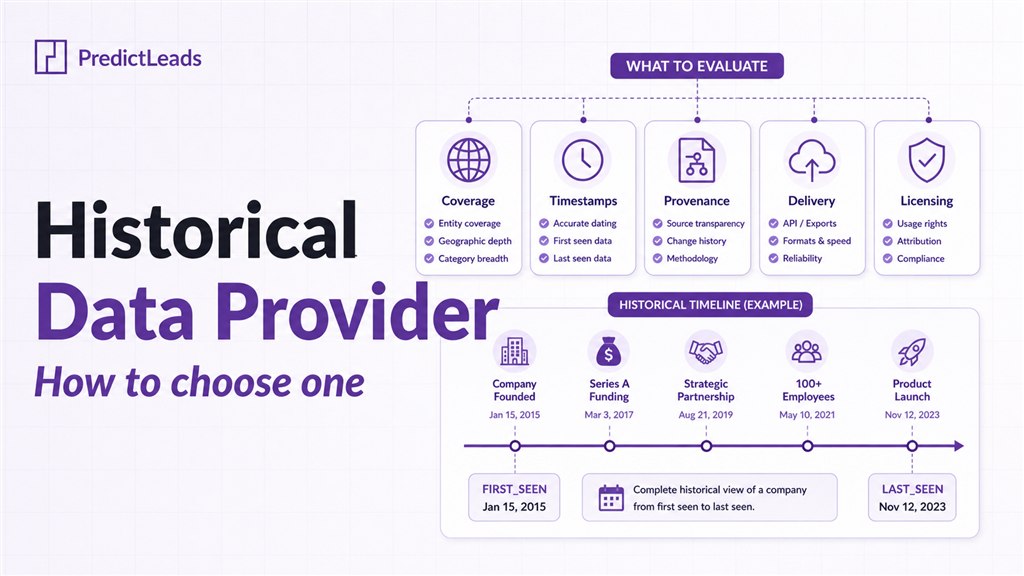
Quick answer: Choose a historical data provider by evaluating coverage, timestamp fidelity, lifecycle tracking, provenance, normalization, licensing, and delivery. PredictLeads supports historical company analysis through datasets for job openings, technology detections, company news events, financing events, website evolution, and company connections.
What Is a Historical Data Provider?
A historical data provider collects company-level signals and keeps the time dimension attached to those signals. That time dimension matters because most GTM questions are not only about what a company looks like today. They are about what changed, when it changed, and whether that change creates a buying window.
Examples of historical company signals include:
- A company first posted several data engineering jobs.
- A new technology appeared in a company’s stack.
- A funding event, product launch, acquisition, or partnership was detected.
- A vendor, customer, partner, or investor relationship appeared.
- A website changed positioning, product pages, pricing, or messaging.
This is what turns static enrichment into operational intelligence. You can use the data to score accounts, build alerts, backtest ICP rules, and route accounts when timing improves.
Why Historical Company Data Matters for GTM
Historical company data helps teams avoid one of the biggest problems in outbound and account scoring: treating every account as equally ready. A company that adopted Snowflake last week, opened ten sales roles this month, or announced a new partnership is in a different state than a company with the same profile but no recent movement.
For GTM teams, history supports:
- Timing: prioritize companies when a relevant signal appears.
- Scoring: separate stable accounts from accounts in motion.
- Personalization: reference real company changes instead of generic pain points.
- Backtesting: test which signals appeared before meetings, opportunities, or churn.
- Market research: track adoption, expansion, hiring, and competitive momentum over time.
How to Evaluate a Historical Data Provider
1. Check Coverage and Signal Types
Start with the signals that matter to your workflow. A GTM team may need job openings, company news, technologies, and funding. An investment team may care more about hiring velocity, financing events, market expansion, and product launches. A partnerships team may need vendor, customer, partner, and integration relationships.
PredictLeads covers multiple historical company signal types, including Job Openings, Technologies, Technology Detections, News Events, Financing Events, Website Evolution, Products, and Connections.
2. Verify Timestamp Quality
A historical data provider is only useful if the timestamps are trustworthy. Look for fields such as first_seen_at, last_seen_at, found_at, and published_at. These fields help you distinguish when something happened, when it was discovered, and whether it is still active.
This is especially important for use cases like hiring momentum, technology adoption, cloud migration tracking, and company news alerts. Without reliable timestamps, teams can confuse stale signals with current intent.
3. Look for Lifecycle Tracking
Good historical datasets track lifecycle, not just existence. For example, a job opening should show whether it is active or closed. A technology detection should show when a tool was first and last seen. A news event should include the discovery date and source context.
Lifecycle tracking helps teams avoid survivorship bias. You can analyze what changed, what disappeared, and what persisted long enough to become meaningful.
4. Inspect Provenance and Source Evidence
Every important company signal should be explainable. A historical data provider should expose source URLs, categories, context, and enough evidence to help your team trust the signal. This matters for sales teams, analysts, investors, and anyone building automated scoring rules.
5. Evaluate Normalization and Schema Quality
Raw web data creates cleanup work. Normalized categories reduce that burden. Look for structured job categories, news event categories, financing round types, relationship types, company domains, stable IDs, and consistent date fields.
For example, PredictLeads normalizes company news into event categories such as partnerships, acquisitions, funding, launches, expansions, leadership changes, and headcount changes. That makes the data easier to filter, score, and route.
6. Confirm Delivery and Licensing Fit
The best dataset is the one your team can actually use. Check whether the provider supports APIs, flat files, webhooks, or warehouse-friendly delivery. Also confirm whether your license supports internal models, CRM enrichment, alerts, analytics, and any redistribution requirements.
Example GTM Workflows Using Historical Data
Hiring Momentum Scoring
Track companies that recently opened several jobs in sales, engineering, data, security, or customer success. Combine job volume, recency, role type, and location to identify companies that may be expanding, entering a new market, or investing in a specific function.
Technology Adoption Alerts
Use first-seen technology detections to identify companies that recently adopted tools such as Snowflake, BigQuery, HubSpot, Salesforce, Databricks, or cloud infrastructure. This helps sales and partner teams act while architecture and vendor decisions are still active.
Company News Triggering
Monitor news events for funding, partnerships, launches, acquisitions, office expansions, leadership changes, and headcount growth. Route relevant events to account owners or use them as inputs for lead scoring.
Customer and Partner Ecosystem Mapping
Use historical connections data to understand which companies buy from, partner with, invest in, or integrate with one another. This helps with consulting, ecosystem strategy, channel research, and competitive analysis.
Common Mistakes When Choosing Historical Data
- Choosing only by database size: coverage matters, but timestamp quality and source evidence matter more for operational workflows.
- Ignoring stale data: a signal from three years ago should not score the same as a signal from this month.
- Skipping source evidence: teams need to know why a signal exists before they trust it in outreach or models.
- Using static enrichment for dynamic decisions: current profiles do not explain timing, momentum, or change.
Why PredictLeads for Historical Company Data?
PredictLeads is built around company signals that change over time. Teams can use PredictLeads to analyze job openings, technology adoption, news events, funding, website changes, products, and company relationships through APIs, flat files, and workflow integrations.
That makes PredictLeads useful for teams that want to build scoring models, account alerts, enrichment workflows, market maps, and AI research systems based on real company movement.
For more tactical workflows, read our guides on job openings data for sales prospecting, technographic data for sales prospecting, and company news data for sales triggers and lead scoring.
Final Takeaway
A historical data provider should help your team understand company change, not just company attributes. Prioritize providers that combine broad coverage with reliable timestamps, lifecycle tracking, normalized categories, source evidence, and delivery methods your team can operationalize.
When you can see what changed and when it changed, you can build better GTM timing, cleaner scoring models, stronger account research, and more relevant outreach.